

Description
Vatigo checks EU VAT identification numbers directly in your WordPress forms – no coding, no API key, no configuration. Install, activate, add the field. Done.
Built for B2B forms: contact and quote requests, dealer and partner registrations, wholesale sign-ups, event registrations with company invoicing – anywhere you need a correctly formatted VAT ID before the form is submitted.
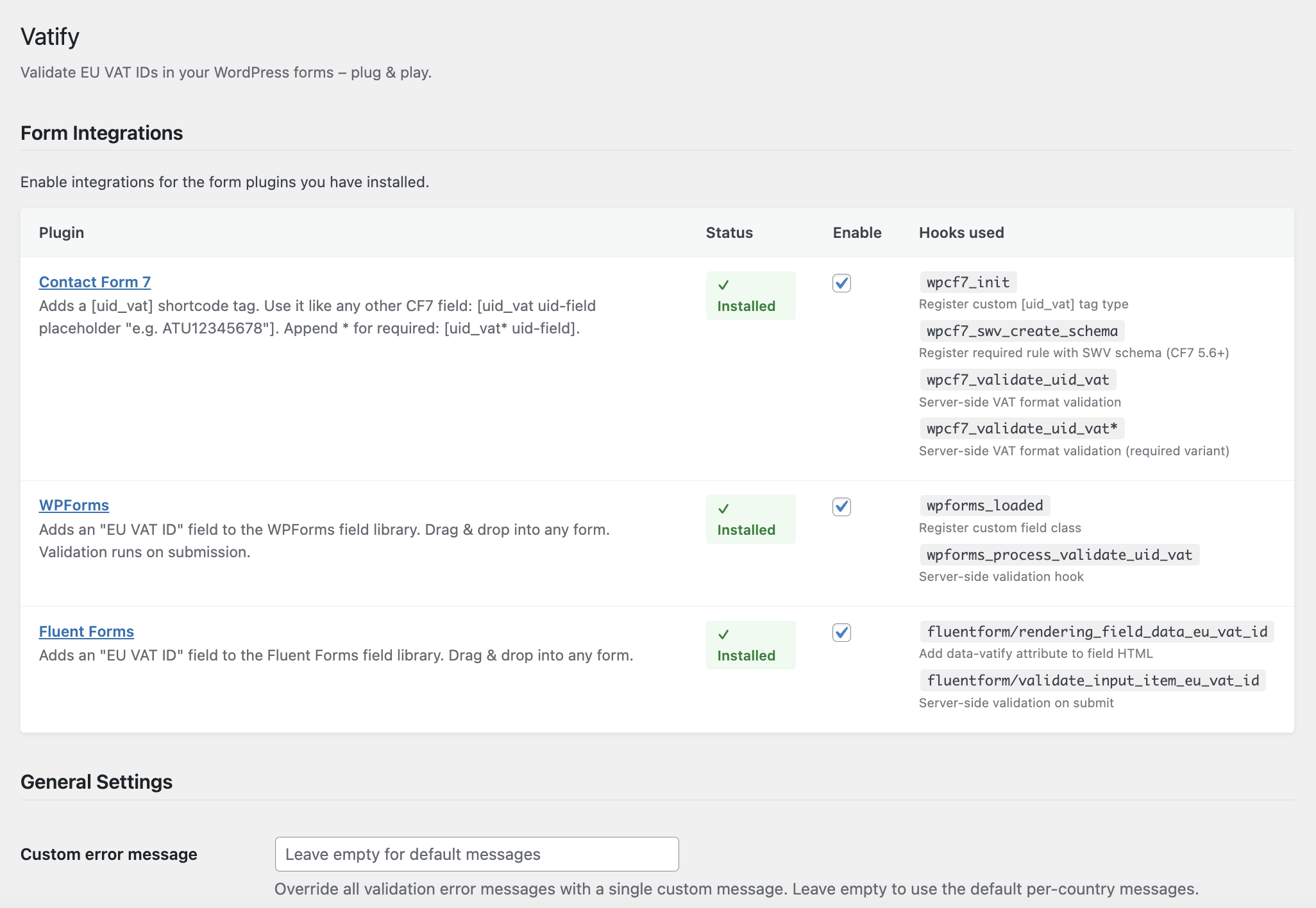
Works with Contact Form 7, WPForms and Fluent Forms.
Why Vatigo?
- Catches typos before they reach your inbox – no more “ATU1234567” (one digit short) or “DE 123 456 78” in your invoices
- All 27 EU member states with country-specific format rules
- Tolerant input – spaces, dots, dashes and lowercase letters are normalized automatically (
atu 1234-5678ATU12345678) - Helpful error messages – the user sees exactly which country format is expected, including an example
- Real-time inline feedback while typing (WPForms)
- Server-side validation on every submission – works even with JavaScript disabled
- 100 % offline – no external requests, no tracking, nothing leaves your server
- GDPR-friendly – VAT IDs are validated in memory and never stored
- Custom error messages via the settings page
- Developer-friendly – add any other form plugin through a simple integration API
Supported countries and VAT ID formats
- Austria – UID-Nummer –
ATU12345678 - Belgium – BTW / n° TVA –
BE0123456789orBE1123456789 - Bulgaria – ДДС номер –
BG123456789 - Croatia – PDV ID –
HR12345678901 - Cyprus – ΦΠΑ –
CY12345678A - Czech Republic – DIČ –
CZ12345678 - Denmark – CVR / moms –
DK12345678 - Estonia – KMKR –
EE123456789 - Finland – ALV-numero –
FI12345678 - France – numéro de TVA intracommunautaire –
FRXX123456789 - Germany – USt-IdNr. –
DE123456789 - Greece – ΑΦΜ –
EL123456789 - Hungary – közösségi adószám –
HU12345678 - Ireland – VAT number –
IE1234567A - Italy – Partita IVA –
IT12345678901 - Latvia – PVN –
LV12345678901 - Lithuania – PVM kodas –
LT123456789 - Luxembourg – n° TVA –
LU12345678 - Malta – VAT number –
MT12345678 - Netherlands – btw-id –
NL123456789B01 - Poland – NIP –
PL1234567890 - Portugal – NIF –
PT123456789 - Romania – CIF / CUI –
RO12345678 - Slovakia – IČ DPH –
SK1234567890 - Slovenia – ID za DDV –
SI12345678 - Spain – NIF / CIF –
ESA12345678 - Sweden – momsregistreringsnummer –
SE123456789012
Contact Form 7: EU VAT ID field
Add the uid_vat form tag to your form template:
[uid_vat uid-field] – optional field
[uid_vat* uid-field] – required field
With placeholder:
[uid_vat* eu-vat-id placeholder "e.g. ATU12345678"]
Required validation uses the Contact Form 7 Schema-Woven Validation (CF7 5.6+).
WPForms: EU VAT ID field
Drag the EU VAT ID field from the field panel into your form. It supports required validation, custom labels, placeholder text and real-time inline feedback while the user types.
Fluent Forms: EU VAT ID field
Drag the EU VAT ID field from the General Fields section into your form.
Styling the inline feedback
The real-time feedback (WPForms) uses the class .vatigo-feedback. To hide it, add this to your theme’s CSS:
.vatigo-feedback { display: none; }
For developers
Register an integration for any other form plugin:
add_action( 'vatigo_register_integrations', function( $manager ) {
    $manager->register( new My_Custom_Integration() );
} );
Your class must extend Vatigo_Integration_Base and implement all abstract methods. The settings page shows a complete example.
Coming in Vatigo Pro
- Live validation against the official EU VIES database (checks whether the VAT number actually exists)
- More features for B2B workflows
Screenshots


Installation
- In your WordPress admin, go to Plugins Add New and search for “Vatigo”.
- Click Install Now, then Activate.
- Go to Settings EU VAT Validator and enable the integrations for the form plugins you use.
- Add the EU VAT ID field to your form (see the instructions for your form plugin above).
FAQ
-
What exactly does Vatigo check?
-
Vatigo checks whether a VAT ID has a valid format for its EU country: correct country prefix, correct length and the right mix of digits and letters. This catches the vast majority of typos and incomplete entries before the form is submitted.
-
Does Vatigo check whether the VAT number really exists (VIES)?
-
Not in the free version. The free version validates the format only, entirely offline. A live check against the official EU VIES database is planned for Vatigo Pro.
-
Which form plugins are supported?
-
Contact Form 7, WPForms (Lite and Pro) and Fluent Forms. Other form plugins can be connected through the developer API.
-
Does it work with the Austrian UID and the German USt-IdNr.?
-
Yes. “UID-Nummer” (Austria), “USt-IdNr.” (Germany), “BTW-nummer” (Netherlands, Belgium), “numéro de TVA” (France), “Partita IVA” (Italy) and “NIF/CIF” (Spain) are all national names for the EU VAT identification number. Vatigo supports all 27 EU member states.
-
What about Swiss, UK or Norwegian VAT numbers?
-
Vatigo validates EU VAT IDs only. Switzerland (CHE…), the United Kingdom (GB…, since Brexit) and Norway are not EU member states and are not supported.
-
Can users type the VAT ID with spaces or lowercase letters?
-
Yes. Spaces, dots and dashes are removed and letters are converted to uppercase before validation, so
atu 1234 5678is accepted asATU12345678. -
Does this call an external API?
-
No. All validation happens on your server. No data is sent to third parties.
-
Is this GDPR compliant?
-
Yes. Vatigo does not store or transmit any personal data. VAT IDs are validated in memory and discarded. What happens with the submitted form data is up to your form plugin.
-
Can I customise the error messages?
-
Yes. Go to Settings EU VAT Validator and enter a custom error message. Leave the field empty to use the default country-specific messages, which include an example of the expected format.
-
The inline feedback looks different from my theme – can I style it?
-
Yes. The feedback element uses the class
.vatigo-feedback. You can hide or restyle it via your theme’s CSS. -
Can I add support for another form plugin?
-
Yes. Extend
Vatigo_Integration_Baseand register your class via thevatigo_register_integrationsaction hook. See the settings page for a code example.
Reviews
There are no reviews for this plugin.
Contributors & Developers
“Vatigo – EU VAT & UID Validator for Contact Form 7, WPForms & Fluent Forms” is open source software. The following people have contributed to this plugin.
Contributors
“Vatigo – EU VAT & UID Validator for Contact Form 7, WPForms & Fluent Forms” has been translated into 6 locales. Thank you to the translators for their contributions.
Interested in development?
Browse the code, check out the SVN repository, or subscribe to the development log by RSS.
Changelog
1.0.2
- Fix: Belgian VAT numbers starting with 1 (issued since 2023) are now accepted
1.0.1
- Tested with WordPress 7.0
- Improved plugin description and documentation
1.0.0
- Initial release
- Contact Form 7 integration with SWV required validation support (CF7 5.6+)
- WPForms integration with real-time inline feedback
- Fluent Forms integration
- Pattern validation for all 27 EU member states
- Admin settings page with integration toggle and hook reference
- Custom error message override
- Extensible integration API