
Description
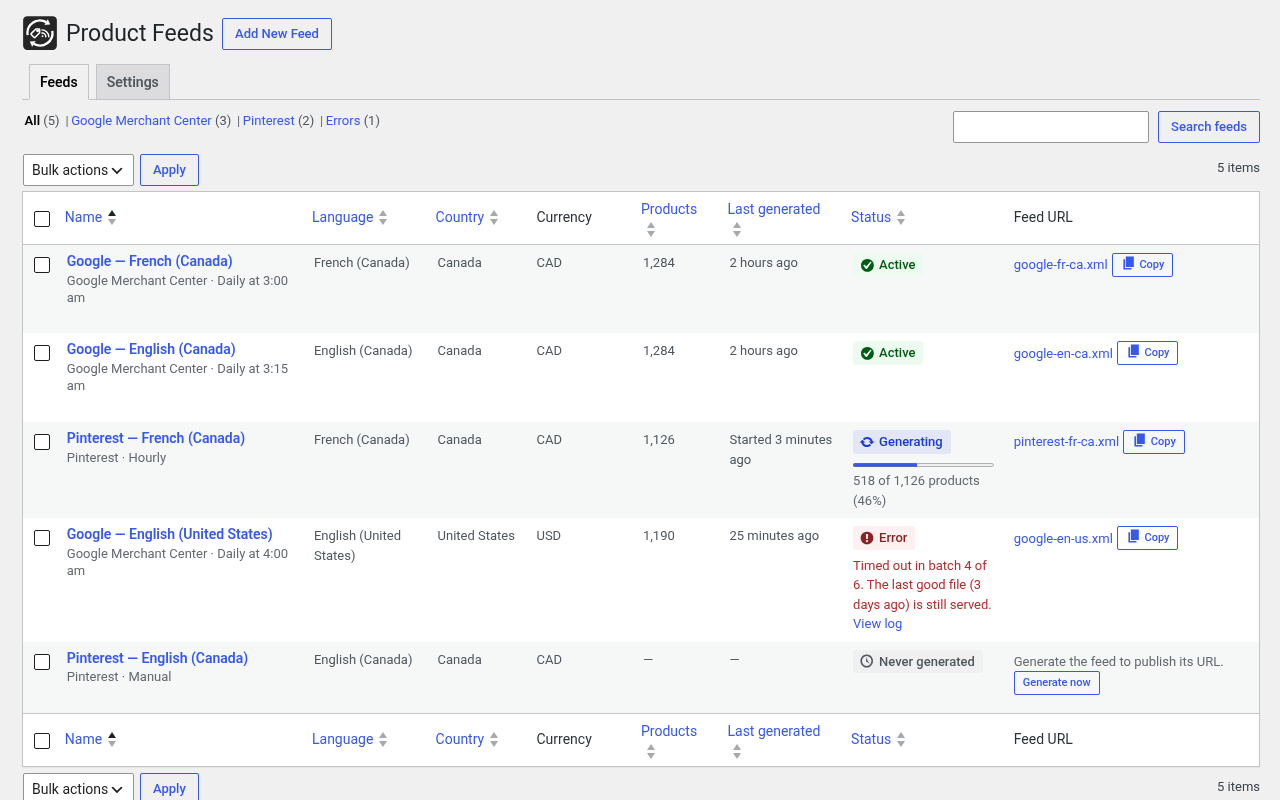
Oli Product Feed builds product feed files for shopping platforms from your WooCommerce catalog. Each feed targets one platform, one language and one currency. Files are generated in the background, in small batches, and their URL never changes, so the platform can fetch them on a schedule.
Channels
- Google Merchant Center (XML RSS 2.0, CSV or TSV)
- Pinterest Catalogs (availability preorder for products on backorder)
- Meta catalogs for Facebook and Instagram (Commerce Manager data feed)
- TikTok Catalog (CSV, TSV or XML)
- Microsoft Merchant Center for Bing Shopping (tab-separated TXT or XML)
- Generic CSV, TSV or XML with your own columns, for comparison sites and marketplaces
- Other channels can be added with the
oliprfe_channelsfilter
Feeds
- Simple and variable products: one item per variation, grouped with
item_group_id - Language and currency per feed: with TranslatePress, titles, descriptions, terms and links are taken in the feed language (the locale is set for the whole generation, including translated permalinks such as
/fr/); with Price Based on Country, prices come from a pricing zone and links can carry the country parameter - Attribute mapping: for every attribute, use the automatic rule or pick a product field, a product attribute, a taxonomy, a custom field (meta), a static value or a copy of another final attribute, with prefix, suffix, fallback and value map; a preview column shows the value for a sample product
- Variant color and size sent by default from the
pa_color(orpa_colour, Color, Colour) andpa_size(or Size) attributes, in the feed language; an explicit mapping always wins - Per-product values for the odd product (for example the color of one item)
- Title template such as
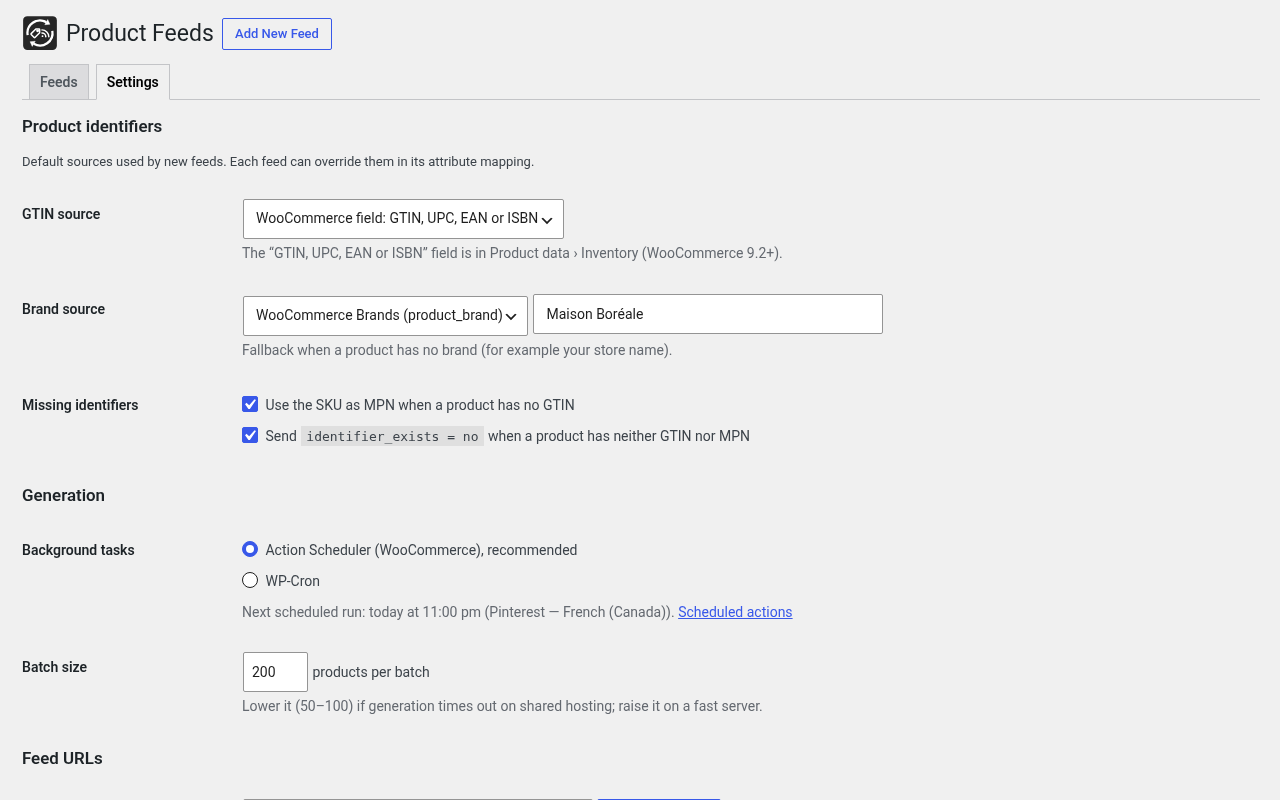
{brand} {name} {type} - {variation}, with the type set per category - GTIN validation (check digit); MPN = SKU for all brands or only for a list of brands
- Filters: categories, tags, price range, stock status, product IDs, words in the title, required fields; exclusion rules and availability rules on custom fields; live count of the matching products
- Backorder availability date: optional per-feed lead time (default 21 days) for products on backorder or sold while out of stock. Google, Microsoft (Bing) and Meta receive
g:availability= backorder (or preorder if configured),g:availability_datein ISO 8601 with the site time zone, and optional handling time. In-stock items are unchanged. A per-product override (days or a fixed date) can be set on the product and on each variation. - Google product category per category or per product
- UTM and extra link parameters
- Clear log: every generation lists the excluded products and why
Generation and serving
- Background generation with Action Scheduler (WP-Cron fallback), in batches, with a lock and an atomic file swap
- Schedule: hourly, twice a day, daily or weekly, at an off-peak hour; optional regeneration when products change (at most every 15 minutes)
- Static file (default) or served by WordPress with a short cache,
X-Robots-Tag: noindex, ETag and Last-Modified, for hosts whose CDN keeps static files too long. The pre-generated file is streamed while the plugins load (never rebuilt during the request); an optional must-use loader serves it even earlier - Logs in WooCommerce > Status > Logs
- Access: the plugin screens need the
manage_woocommercecapability (administrators and shop managers); when shop manager access is turned off in the settings,manage_options(administrators) - WP-CLI:
wp oli-feed list|generate|status|export|import|settings
Privacy
The plugin makes no external request, loads no remote asset and collects no data. Feeds only contain public product data.
Screenshots
Installation
- Upload the plugin and activate it (WooCommerce is required).
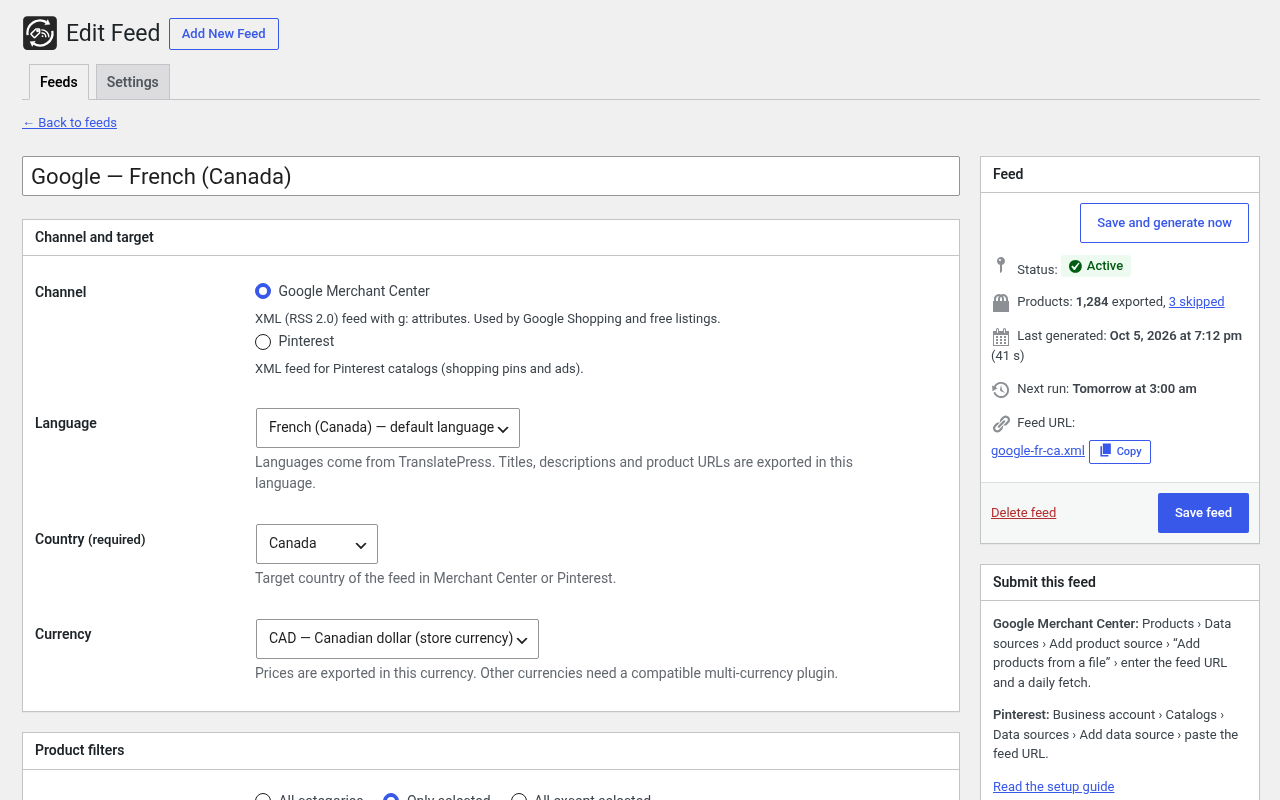
- Go to WooCommerce > Product Feeds and click Add New Feed.
- Choose the channel, language, country and currency, then save and generate.
- Copy the feed URL into the platform (Merchant Center, Pinterest, Commerce Manager) as a scheduled fetch.
FAQ
-
The platform still sees an old version of the feed
-
Your host or CDN probably caches static files for a long time. In Settings, choose Through WordPress: the feed is then served with a short cache (one hour by default) and validators, and the URL becomes
/?oliprfe_feed=<file>. -
How do I generate a feed from the command line?
-
wp oli-feed generate or
wp oli-feed generate --all. -
How do I make the WordPress serving faster?
-
The feed is sent while the plugins load, before WooCommerce, from the pre-generated file.
-
Who can manage the feeds?
-
Users with the
manage_woocommercecapability: administrators and shop managers. Uncheck “Shop managers” in WooCommerce > Product Feeds > Settings to requiremanage_options(administrators only). -
Where are the files?
-
In
wp-content/uploads/oli-product-feed/by default. The folder can be changed in Settings or with theoliprfe_output_dirfilter (return the same folder on every request). When it changes, the feed files move to the new folder and the previous folder is cleaned: only the files the plugin wrote are deleted, and the folder itself only when the plugin created it and nothing else is in it. A folder that cannot be used (a symbolic link or inside one, real path outside the uploads directory, not writable, cannot be created) is refused: the feeds stay where they are, nothing is moved or deleted, and the plugin screens show a notice. A file of the same name that the plugin did not write is never overwritten or deleted: the feed stays in its previous folder until that file is removed. -
What is deleted when the plugin is deleted?
-
The scheduled tasks and their Action Scheduler history are always removed. When Delete all data when the plugin is deleted is checked, the feeds, the settings, the generated files of every output folder the plugin used and its WooCommerce logs (source
oli-product-feed) are deleted too. Files and folders the plugin did not write or create are never touched, and no symbolic link is followed. When it is unchecked (default), the feeds, settings, files and logs are kept.
Reviews
There are no reviews for this plugin.
Contributors & Developers
“Oli Product Feed” is open source software. The following people have contributed to this plugin.
Contributors
Translate “Oli Product Feed” into your language.
Interested in development?
Browse the code, check out the SVN repository, or subscribe to the development log by RSS.
Changelog
0.4.1
- Fix: TranslatePress fr_CA feeds no longer write doubled language slugs (
/fr/fr/…, a 404) orhttp://on item links and the channel<link>. URLs that already have/fr/are left as-is; default-language URLs are converted once;force_httpsis applied after conversion.
0.4.0
- NEW: Automatic availability date for products sold on backorder or while out of stock (lead time in days, default 21). Google, Microsoft (Bing) and Meta; optional handling time; per-product override on the product edit screen and on variations.
- Fix: TranslatePress feed language (e.g. fr_CA) now switches the current language and locale while the feed is generated, so titles, descriptions and /fr/ links are taken from TranslatePress instead of staying in English.
0.3.9
- WordPress.org review: the optional must-use loader is removed (no file outside the plugin is loaded).
- No inline style attribute in the admin footer (moved to the enqueued stylesheet).
- Admin script and style handles use the plugin prefix (oliprfe-admin).
0.3.8
- The support notice dismiss handler is now attached to the enqueued admin script with
wp_add_inline_script()(no inline<script>tag).
0.3.7
- NEW: Feeds and Donate links on the Plugins screen, optional support notice on plugin screens, footer donation link, and Donate link on the WordPress.org plugin page (PayPal)
0.3.6
- Namespace renamed from
OliProductFeedtoOliprfeso the plugin prefix is a single segment of four or more characters (the previous namespace was detected as the too-short prefixoli). - Admin output: every form fragment is escaped late with
wp_ksesat the echo site (no unsanitized variables echoed). - Optional must-use loader: loads the local Endpoint file with a literal path under
WP_PLUGIN_DIRwhen the plugin is active (no remote file access, no variablerequire).
0.3.5
- Prefix: every global constant, function, hook and variable now uses the
oliprfe_/OLIPRFE_prefix (options, meta keys, transients, post type and actions included) so Plugin Check recognizes the plugin prefix. Theoli-product-feedtext domain is unchanged. - Feed editor: the posted configuration is sanitized before it is validated, saved or kept for redisplay after an error (no unsanitized input is stored).
- Translations are loaded by WordPress automatically (the
load_plugin_textdomain()call was removed); language files are served from the WordPress.org translation platform and are no longer bundled. - Optional must-use loader: early path when the plugin is active.
0.3.4
- Output folder: a new folder that cannot be used (symbolic link, outside uploads, not writable, cannot be created) is refused. The feeds stay in their folder and keep being served, nothing is moved or deleted, and a notice explains why.
- A feed file is never moved over, or generated over, a file of the same name that the plugin did not write: the feed stays in its previous folder and a notice explains what to do.
- The output folder is no longer written through a symbolic link (the uploads directory itself may be one).
0.3.3
- Output folder: when it changes (setting or
oliprfe_output_dirfilter), the feed files move to the new folder and the previous folders of the plugin are cleaned. The folders and files the plugin wrote are recorded; nothing else is ever deleted. - Uninstall with “Delete all data”: every output folder the plugin used is cleaned, and the plugin’s WooCommerce logs (log files and database log rows) are deleted.
- A feed moved to the trash by any path (Posts API,
wp_update_post, WP-CLI) has its file removed at once, so the static URL no longer serves it.
0.3.2
- Color and size of variants sent by default from the pa_color and pa_size attributes (explicit mapping first).
- A trashed feed is no longer served: its file is removed and the WordPress serving index refreshed, also when trashed outside the plugin.
- Static file mode:
?oliprfe_feed=answers 404 instead of the home page. - Uninstall also removes the plugin’s Action Scheduler history (actions, logs, group) and the files of trashed feeds.
- Feed list: distinct URL label per feed with WordPress serving; no horizontal overflow.
- Documentation: access capability (manage_woocommerce, or manage_options).
0.3.1
- Fix: with WordPress serving, the file of an inactive feed (imported or saved inactive, then generated) answered 404. Every generated feed is now served; inactive only stops the scheduled generation.
0.3.0
- TikTok, Microsoft (Bing) and generic CSV/TSV/XML channels.
- Tag and price range filters, matching products count, value preview in the mapping, list search and Errors view.
- Mapping source “copy of another attribute” (final value) and per-product values.
- Descriptions: translated meta description when the content has no translation; French spacing before ; : ! ? kept.
- Title type: same rule in every language; optional words in brackets.
- WordPress serving: the file is sent while the plugins load (optional must-use loader), application/xml, max-age bounded by the regeneration interval.
- Settings: logs, shop manager access, regeneration on product changes, regenerate all, next run.
0.2.0
- Admin screens: feed list, complete feed editor, settings, generate, duplicate and delete, bulk actions, progress.
- Pinterest and Meta channels.
- Title template per feed, MPN rule by brand list, priority brands.
- Description cleanup patterns and field rules per Google category.
- WP-CLI: run-due.
- Optional serving through WordPress with short cache headers.
- French (France and Canada) translations.
0.1.0
- First version: Google Merchant Center feeds, TranslatePress, Price Based on Country, batches, WP-CLI.