

Description
Essential Elements adds the small features most WordPress sites end up needing, without installing a separate plugin for each one.
Every feature is a module you switch on or off from one screen. Disabled modules load nothing at all, and enabled modules only load a few kilobytes of CSS and plain JavaScript, with no jQuery and no external requests.
🚀 Essential Elements Pro | 📄 Documentation | 💻 Support
⬆️ Scroll to Top Button
Add a button that takes visitors back to the top of long pages.
- Bottom left or bottom right position, with adjustable offsets
- Four icon presets, three shapes and a custom size
- Icon, background and hover colors
- Show it after a set scroll distance, and optionally hide it on mobile
- Accessible: a real keyboard-focusable button with a screen-reader label
- Respects the visitor’s “reduce motion” setting
📊 Reading Progress Bar
Show how far a visitor has scrolled through the page.
- Top or bottom of the screen (sits below the admin bar when logged in)
- Thickness, bar color and an optional gradient
- Percentage label you can show or hide
- Show it everywhere, or only on selected post types
⏱️ Reading Time
Display “1,240 words, 7 minutes read time” on your posts.
- Insert automatically before or after the content
- Long (“7 minutes read time”) or short (“7 min read”) format
- Choose which post types show it, and optionally show it in blog, archive and search listings
[esse_reading_time]shortcode to place it anywhere- Set the reading speed (words per minute) and an optional label
- Word counting works with every language, including Bengali, Hindi, Arabic, Chinese and Japanese
- Reading Time block to place it anywhere, including inside a Query Loop
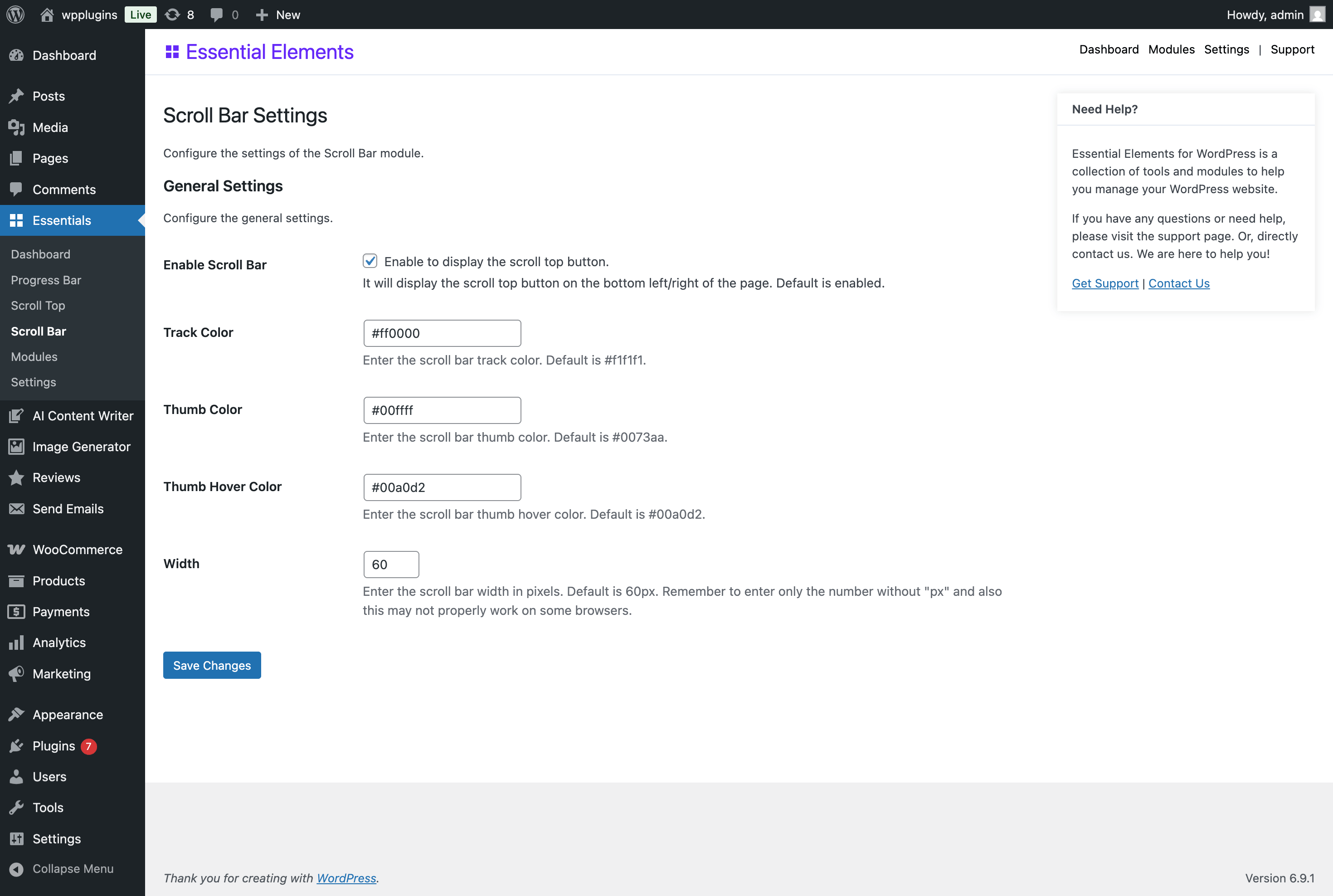
🎨 Custom Scroll Bar
Match the browser scroll bar to your brand.
- Track, thumb and hover colors, with ready-made presets
- Scroll bar width and thumb radius
- Live preview while you edit
💎 Essential Elements Pro
Essential Elements Pro adds premium modules to the same dashboard:
- Announcement Bar: a top or bottom notice bar with a call to action button, scheduling, a countdown timer and dismiss memory.
- Click to Chat: floating WhatsApp, Messenger, Telegram, phone, SMS and email buttons with business hours.
- Content Protection: discourage copying with right-click, text selection and copy shortcut protection, with an optional “Read more at” link on copied text.
Import & export
Move your enabled modules and all their settings to another site with a JSON file, from Essentials Settings.
Developer friendly
esse_modules_listfilter to register your own modules; entries with aclassand asettingsclass (extendingEssentialElements\Admin\ModuleSettings) are loaded automaticallyesse_module_{id}_sectionsfilter to add settings fields to a module, andesse_module_{id}_outputfilters to change a module’s markupesse_export_settingsfilter andesse_import_settingsaction to include your own settings in import and exportesse_initaction that fires once all modules are loadedesse_screen_idsfilter to load the admin styles on your own pages
License
Essential Elements for WordPress is distributed under the terms of the GNU General Public License v2 (GPLv2). You may use, modify, and distribute this software under the terms of the GPLv2 license. See https://www.gnu.org/licenses/gpl-2.0.html for more details.
Screenshots



Blocks
This plugin provides 1 block.
- Reading Time Display the estimated reading time for the current post to keep readers informed.
Installation
- Install the plugin from Plugins Add New, or upload the
essential-elementsfolder to/wp-content/plugins/. - Activate the plugin.
- Go to Essentials Modules and switch on the modules you want.
- Click Configure on a module card to adjust its settings.
FAQ
-
Will this slow down my website?
-
No. A module that is switched off loads no files. Enabled modules use small CSS files and plain JavaScript with no jQuery dependency.
-
Can I disable features I don’t need?
-
Yes. Every module is switched on or off from Essentials Modules.
-
Is it compatible with my theme?
-
It works with both block themes and classic themes. All output is added with standard WordPress hooks.
-
Does the plugin collect any data?
-
No. Essential Elements does not track visitors, set cookies or contact external services.
-
What happens to my settings when I uninstall?
-
Settings are kept unless you enable Delete plugin data on uninstall in Essentials Settings.
-
Can I copy my settings to another site?
-
Yes. Use Export Settings in Essentials Settings on one site, then Import Settings on the other.
-
Where can I get help?
-
Post in the support forum or read the documentation.
Reviews
There are no reviews for this plugin.
Contributors & Developers
“Essentials – Essential Elements for WordPress” is open source software. The following people have contributed to this plugin.
Contributors
Translate “Essentials – Essential Elements for WordPress” into your language.
Interested in development?
Browse the code, check out the SVN repository, or subscribe to the development log by RSS.
Changelog
1.3.0 (14 October 2026)
- New: Scroll to Top icon presets, shape, size, offsets, a “show after” scroll distance, and an option to hide it on mobile.
- New: Progress Bar thickness, gradient, option to hide the percentage, and an option to show it only on selected post types.
- New: Reading Time
[esse_reading_time]shortcode, a short “X min read” format, and an option to show it in blog, archive and search listings. - New: Custom Scroll Bar color presets, thumb radius and a live preview.
- New: Import and export all settings as a JSON file.
- New: Filter the Modules screen by category.
- New: Color pickers and a “Settings saved” notice on module settings pages.
- Dev: Shared module settings framework, registry-driven module loading, and new filters and actions for extensions.
- Fix: Admin styles now load when the “Essentials” menu title is translated.
- Fix: Module on/off notices are translatable, and a failed change is undone instead of looking saved.
- Fix: An invalid color no longer saves an empty value.
1.2.9 (14 October 2026)
- New: Modules screen now shows the modules available in Essential Elements Pro.
- New:
esse_initaction andesse_iconsfilter for extensions. - Fix: Scroll to Top button was loading the wrong stylesheet and appeared unstyled.
- Fix: Re-activating the plugin no longer resets module settings to their defaults.
- Fix: Turning a module on or off could store the wrong state.
- Fix: Reading Time now counts words correctly in non-Latin languages.
- Fix: Progress bar placed at the top no longer hides behind the admin bar.
- Improvement: Scroll to Top is now a keyboard-accessible button with a screen-reader label.
- Improvement: Frontend scripts rewritten without jQuery and throttled for smoother scrolling.
- Improvement: Reading Time styles only load on the post types where it is shown.
- Improvement: Removed the duplicate “Enable” option from each module’s settings page; use the Modules screen instead.
- Improvement: Color settings are validated as hex colors.
1.2.5 – 1.2.8
- Maintenance: Routine compatibility releases.
1.2.4 (21 August 2026)
- Compatibility: Ensured compatibility with the latest version of WordPress 7.1.
1.2.1 (14 July 2026)
- Fix: Fixed few known issues and bugs.
1.2.0 (19 June 2026)
- New: Update plugin UI and settings page for better user experience and easier navigation.
- New: Reading Time Estimation module – automatically displays “X words, Y minute read time” before or after your post content, with configurable post types, reading speed, label, and word count.
- New: Reading Time block – place the estimated reading time anywhere in the editor with options for reading speed, word count, icon, and label.
- Fix: Fixed some bugs and issues.
- Compatibility: Ensured compatibility with the latest version of WordPress 7.0.
1.1.0 (19 May 2026)
- Fix: Addressed some bugs and issues.
1.0.1 (11 February 2026)
- New: Added new features and improvements.
- Fix: Fixed some bugs and issues.
1.0.0 (11 April 2025)
- Initial release of the plugin.