
Description
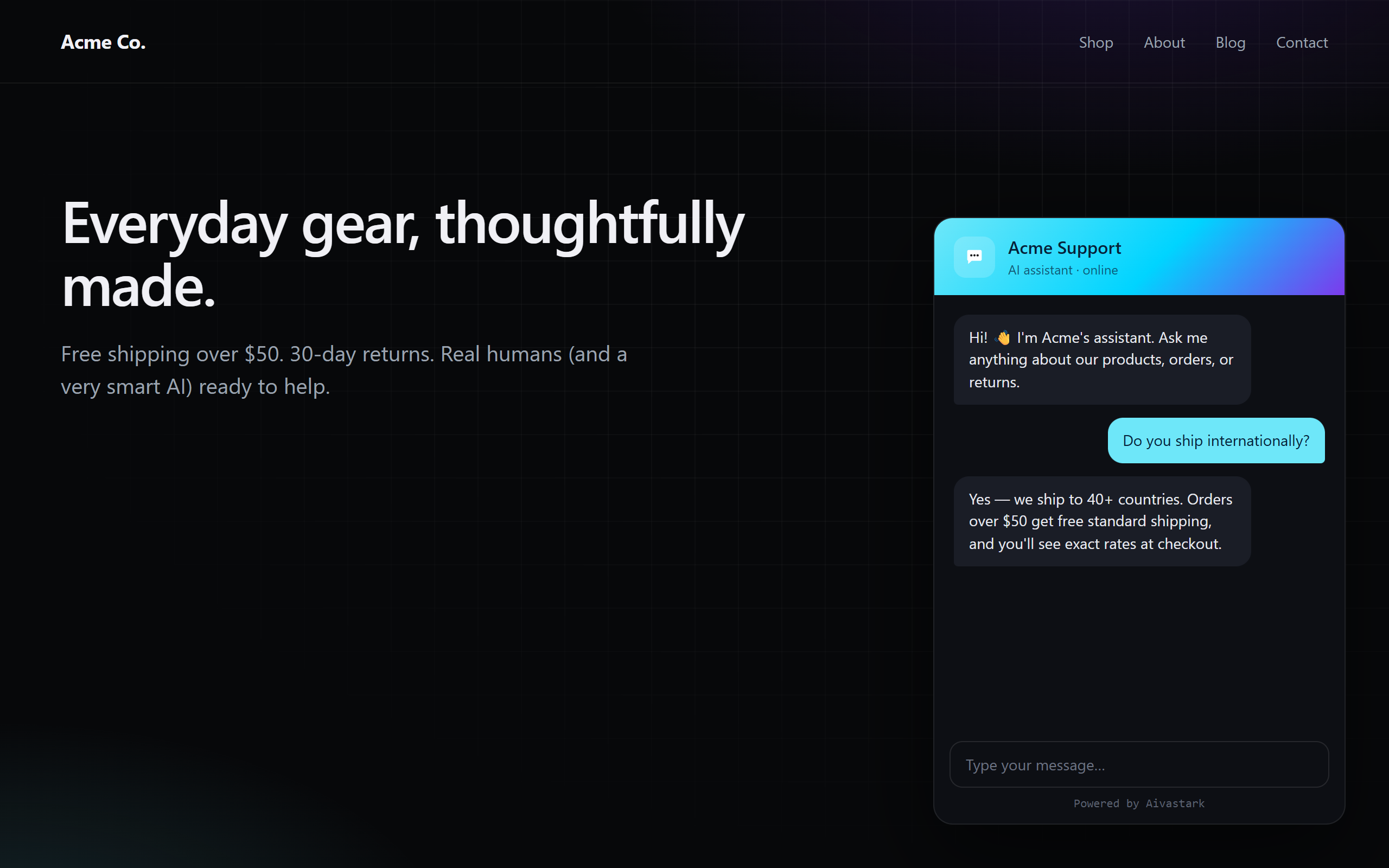
Aivastark Widget adds the Aivastark AI support chat widget to your WordPress site in seconds. Trained on your own knowledge base, it answers visitor questions 24/7 and hands off to a human agent when needed.
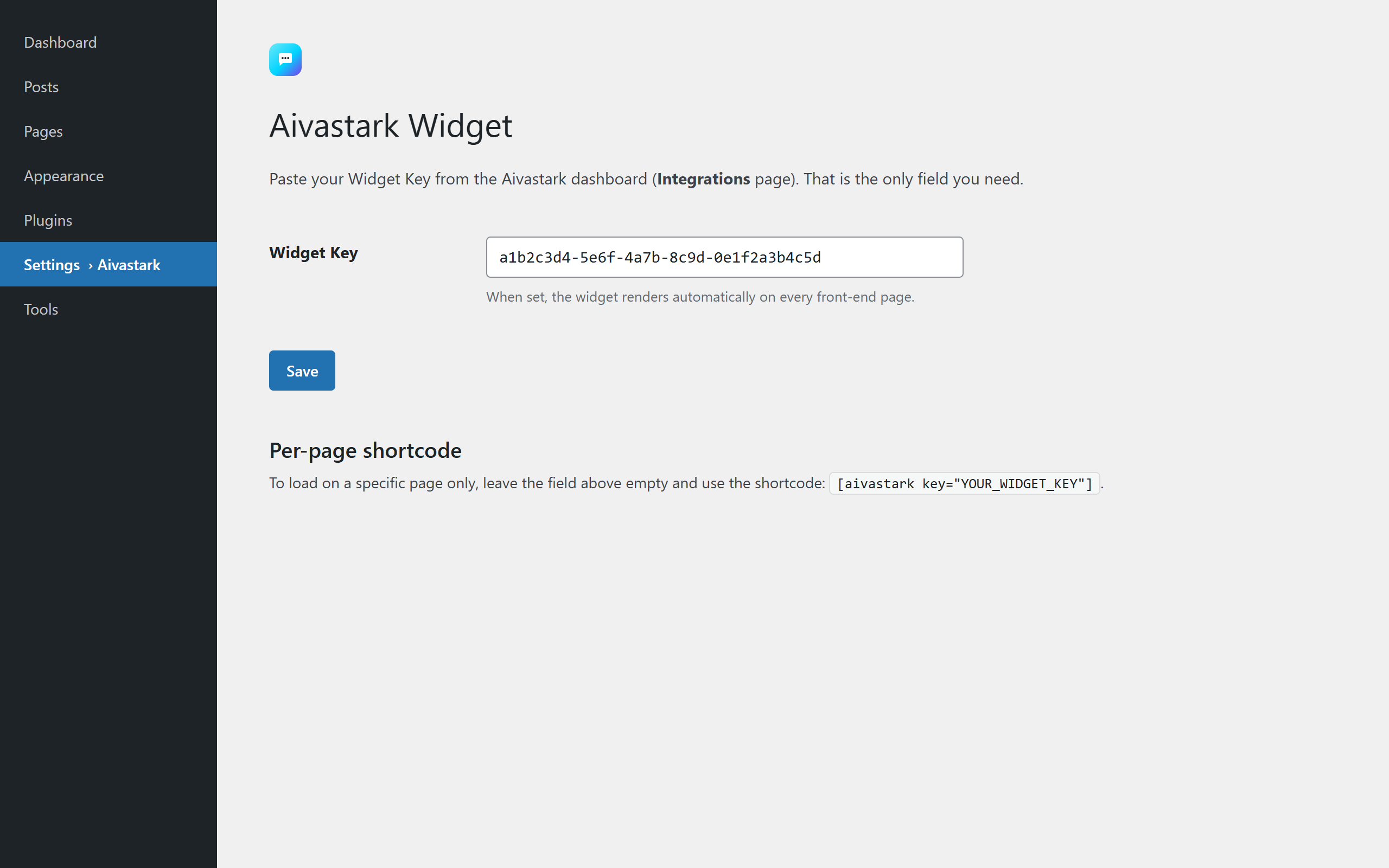
One field. That’s it. Paste your Widget Key from the Aivastark dashboard and the widget is live site-wide. You can also use the [aivastark key="..."] shortcode on individual pages.
Run it without leaving WordPress. Click Connect once to securely link your site to your Aivastark project. Aivastark then opens as a full-screen app inside wp-admin, with its own navigation: the Widget editor, the Inbox, the Knowledge base, Leads, Analytics, AI agent settings and more, already signed in. No second login each time.
Decide where it shows. Display rules choose the pages (by type, by page or by URL path), the devices, the visitors (everyone, logged out, logged in, or not certain roles) and how early the widget loads, all without code.
Features
- AI chat trained on your knowledge base (PDFs, URLs, documents)
- Fully white-label — your brand, your colors, your logo
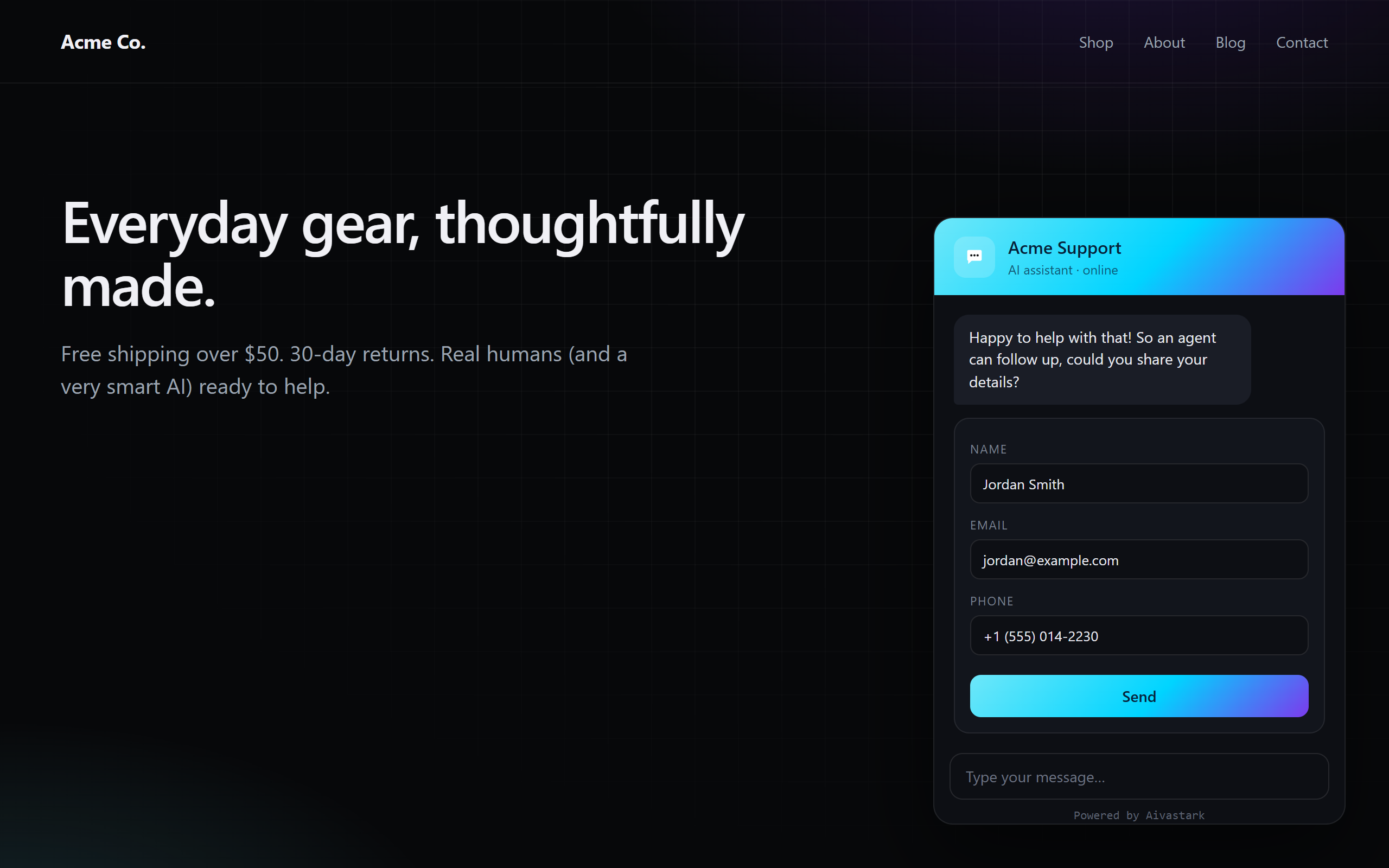
- Lead capture (trigger by message count, keyword, idle time, or manual)
- Live agent handoff via realtime notifications
- A full-screen Aivastark app inside wp-admin: widget editor, inbox, knowledge base, leads, tickets, analytics and AI agent settings, via a secure one-click connection
- Display rules: show the widget on every page, only on some, or everywhere but some; desktop, phones or both; everyone, logged-out visitors or logged-in users; hide it from chosen roles
- Load the widget right away, after a delay, or on the visitor’s first interaction
- Knowledge sync: your knowledge base flags itself when you publish or update content here
- Or manage everything from the Aivastark dashboard — your choice
- Domain whitelisting enforced server-side
- Conversation and rate limits enforced server-side
- Markdown-formatted responses
- Lightweight — the widget is loaded asynchronously and never blocks page rendering
Get a Widget Key
You need a free Aivastark account. Sign up at aivastark.com, create a project, and copy the Widget Key from the Integrations page.
Third-party service notice
This plugin is a client for the Aivastark hosted service. To function, it loads the widget script from https://www.aivastark.com/widget.js and chat conversations are processed by the Aivastark backend. Full disclosure of every endpoint and the data sent is in the External services section below.
By installing this plugin you agree to the Aivastark Terms of Service and Privacy Policy.
External services
This plugin connects to the Aivastark hosted service to function. Without this connection there is no chat widget — the plugin cannot work locally only.
1. Widget script (CDN)
- What it does: Loads the JavaScript file that renders the chat widget on your site’s front-end.
- Endpoint:
https://www.aivastark.com/widget.js - When: On every front-end page load where the Widget Key is configured (site-wide or via shortcode).
- Data sent: A standard browser HTTP GET — User-Agent, Referer, IP address. No site content, no visitor PII.
2. Chat backend (runtime, browser Aivastark API)
- What it does: Handles the chat conversation between the visitor and the AI assistant.
- Endpoint:
https://www.aivastark.com/api/*(subdomains may be used; all requests originate from the visitor’s browser, not from the WordPress server). - When: Only when a visitor actively opens the widget and sends a message. No requests are made until the visitor interacts.
- Data sent: The visitor’s chat messages, the Widget Key (identifies your project), an anonymous session ID, the page URL the chat was opened from, and standard browser headers. If the visitor submits a lead form inside the widget, the fields they enter (typically name, email, phone) are also sent.
- Data sent — only if you enable “Know your logged-in visitors” (off by default): for signed-in visitors only, their WordPress user ID, display name, email address and primary role, so the assistant can address them by name and avoid re-asking for details. Nothing extra is sent for visitors who are not logged in, and the setting can be switched off at any time from Aivastark Settings.
3. Pairing & customization (optional — only if you click Connect)
- What it does: Securely links this WordPress site to one Aivastark project (OAuth Authorization Code + PKCE) and lets you open the Aivastark sections (widget editor, inbox, knowledge base, leads, analytics and the rest) inside wp-admin. The site stores a scoped, revocable access token; only a hashed copy is kept on the server. The token is used to mint a one-time sign-in ticket each time you open one of those sections.
- Endpoints:
https://xckrihmmdwddvcwohvaz.supabase.co/functions/v1/wordpress-tokenand.../wordpress-sso(called from your WordPress server). The connection-approval pagehttps://www.aivastark.com/authorize/wordpressand the Aivastark apphttps://www.aivastark.com/embed/wp/appare loaded in your browser (the latter inside an iframe in wp-admin, where it then shows pages underhttps://www.aivastark.com/dashboard). - When: Only after you click Connect (the approval page) and when you open an Aivastark section in wp-admin (the iframe + ticket). Nothing is sent until you opt in by connecting.
- Data sent: Your site URL, the chosen Aivastark project id, and the scoped token. While a section is open, what you do there (widget appearance, AI settings, knowledge base edits, replies you send from the inbox) is saved to your Aivastark project, exactly as in the Aivastark dashboard. No WordPress site content or visitor data is sent by this flow.
- Data received: alongside the token, Aivastark returns this project’s signing secret. It is stored locally (autoload off, never displayed) and used only to compute an HMAC of the logged-in user’s ID when Know your logged-in visitors is on, so Aivastark can verify that identity. It is deleted when you disconnect or delete the plugin.
4. Knowledge sync (only while connected, and switchable off)
- What it does: Tells Aivastark that this site’s content changed, so the knowledge base can show a “Site changed” badge with a Refresh button instead of going stale. It never starts a re-crawl by itself.
- Endpoint:
https://xckrihmmdwddvcwohvaz.supabase.co/functions/v1/kb-change-signal(called from your WordPress server, on WP-Cron). - When: At most once every five minutes, after a public post or page is published, updated, unpublished, trashed or deleted. Only while the site is connected, and only if Knowledge sync is on (it is on by default; switch it off in Aivastark Settings or on Home).
- Data sent: The scoped token (which identifies your project) and the fixed reason
content_update. No post title, URL, content or user data.
5. Deactivation feedback (optional — only if you click “Submit & Deactivate”)
- What it does: When you deactivate the plugin, an optional prompt asks why. If you choose to submit, your selected reason, optional comment, and the email shown (your WordPress account email) are sent to Aivastark to help improve the product.
- Endpoint:
https://xckrihmmdwddvcwohvaz.supabase.co/functions/v1/wordpress-feedback(called from your WordPress server). - When: Only when you click Submit & Deactivate in the feedback prompt. Clicking Skip & Deactivate or Cancel sends nothing.
- Data sent: The reason you selected, your optional comment, the email shown in the prompt, your site URL, the plugin version, and your WordPress version. No site content or visitor data.
Service provider
- Provider: Aivastark
- Terms of Service: https://www.aivastark.com/terms
- Privacy Policy: https://www.aivastark.com/privacy
Screenshots
Installation
- Upload the plugin
.zipfile to/wp-content/plugins/or install it via Plugins Add New Upload Plugin. - Activate Aivastark – AI Agent through the Plugins menu in WordPress.
- Open Aivastark in the WordPress menu and click Connect to Aivastark, or go to Aivastark Settings and paste your Widget Key.
- The widget is now live on every front-end page. Fine-tune where it shows in Aivastark Display rules.
To use it on a single page instead, leave the Widget Key field empty and paste the shortcode [aivastark key="YOUR_WIDGET_KEY"] where you want the widget to load.
FAQ
-
Do I need any other settings, API keys, or URLs?
-
No. Version 2.0 collapsed the old four-field config into a single Widget Key. Everything else (API endpoint, project settings, theme) is resolved automatically from the key.
-
Where do I get a Widget Key?
-
Create a free account at aivastark.com, create a project, and copy the Widget Key from the Integrations page in your dashboard.
-
Is the widget served from WordPress or a CDN?
-
The widget script is served from the Aivastark CDN (
https://www.aivastark.com/widget.js) by default. You can self-host by filteringaivastark_widget_script_url. -
Can I self-host the widget script?
-
Yes. Add this to your theme or a custom plugin:
add_filter( 'aivastark_widget_script_url', function () { return 'https://your-cdn.com/widget.js'; } ); -
Does the widget slow down my pages?
-
No. The widget script is registered with WordPress, loaded in the footer, and never blocks rendering. If you want it out of the first page load entirely, Aivastark Display rules When it loads can start it after a delay or on the visitor’s first scroll, tap, click or key press.
-
What data is sent to Aivastark?
-
By default: only conversation messages typed by visitors who open the widget, plus the Widget Key (to identify your project) and the visitor’s session ID. No page content, no cookies on the host site, and no visitor tracking beyond what is needed for the chat session itself.
If you switch on Know your logged-in visitors (off by default, see below), the logged-in user’s WordPress user ID, display name, email address and role are also included. See the External services section for the full breakdown.
-
What is “Know your logged-in visitors”?
-
An optional setting — off unless you turn it on — that tells the assistant who is signed in, so it can greet them by name, recognize them across devices, and stop asking for details your site already has. Turn it on from Aivastark Home (one click) or Aivastark Settings.
Nothing is sent for visitors who are not logged in. The values are the user’s WordPress ID, display name, email address and primary role.
Two things to know before enabling it:
- These details are rendered into the page for that signed-in visitor, so they reach Aivastark from the browser. They are suitable for greeting and personalization, and are not used to grant access to anything.
- If your site has users in the EU/UK, sharing their name and email with a processor is a decision for you to make — that is exactly why this ships switched off.
Developers can extend or replace the values with the
aivastark_widget_user_contextfilter (for example to add a membership tier, subscription plan, or lifetime value). -
Does this plugin work with caching plugins?
-
Yes. The widget config is inlined per-request; caching plugins that preserve
<script>tags inwp_footerare fully compatible.When Know your logged-in visitors is on and a logged-in user is being served, the plugin also defines
DONOTCACHEPAGEfor that request, so a page containing one person’s name can never be cached and served to somebody else. WP Rocket, LiteSpeed Cache, W3 Total Cache and WP Super Cache all honour this. Anonymous page views are untouched, so your page cache keeps working normally. -
Can I customize the widget from WordPress instead of the dashboard?
-
Yes. Go to Aivastark Home and click Connect, approve the connection in your Aivastark account (one time), then open Aivastark Widget editor. The full editor (Content, Style, AI, Designer) loads right inside wp-admin and your changes save to your project. The Inbox, Knowledge base, Leads, Analytics and the other sections in the app’s menu work the same way. You can disconnect anytime from Home or Settings.
-
Aivastark opens full screen so the inbox and editor get the room they need. Click the menu button at the top left to bring WordPress’s menu back; WordPress remembers your choice.
-
Can I choose which pages show the widget?
-
Yes, in Aivastark Display rules: every page, only on chosen pages, or everywhere except chosen pages. Choose by page type (home page, posts, pages, archives, search, 404, and WooCommerce shop, product, cart, checkout and account pages when WooCommerce is active), by specific page, or by URL path with
*as a wildcard. The same screen limits it to desktop or phones, to logged-out or logged-in visitors, hides it from chosen roles, and sets when it loads. Developers can overrule any decision with theaivastark_widget_should_renderfilter. -
Is connecting required?
-
No. Connecting is optional — it adds the in-WordPress app (editor, inbox, knowledge base, leads, analytics) and Knowledge sync. Display rules work without it. If you prefer, paste your Widget Key in Aivastark Settings (or use the shortcode) and skip Connect entirely; the widget works exactly as before.
-
How do I remove all data this plugin stored when I delete it?
-
Use Plugins Delete in WordPress. The bundled
uninstall.phpremoves the plugin’s options (aivastark_widget_options, and if you connected,aivastark_widget_secretwith the scoped token andaivastark_widget_signing_secret) and any queued Knowledge sync event. No tables, no extra rows. Disconnecting first also revokes the token on the server.
Reviews
There are no reviews for this plugin.
Contributors & Developers
“Aivastark – AI Agent” is open source software. The following people have contributed to this plugin.
Contributors
Translate “Aivastark – AI Agent” into your language.
Interested in development?
Browse the code, check out the SVN repository, or subscribe to the development log by RSS.
Changelog
2.5.0
- New: Aivastark opens as a full-screen app in wp-admin, with its own top bar and navigation, and other plugins’ banners kept out of the way. The menu button at the top left brings WordPress’s sidebar back (remembered per user).
- New: much more of Aivastark runs inside WordPress once you connect: Inbox, Knowledge base, Leads, Tickets, Analytics, Visitors, AI agent, Chat settings, Quick responses and Automations, next to the Widget editor (formerly Customize Widget). Switching between them doesn’t reload the page.
- New: Display rules — show the widget on every page, only on some or everywhere but some (by page type, page, or URL path with wildcards, including WooCommerce pages); on desktop, phones or both; for everyone, logged-out visitors or logged-in users; hidden from chosen roles; and loaded right away, after a delay, or on first interaction. New
aivastark_widget_should_renderfilter. - New: an on/off switch for the widget on this site, without removing the Widget Key.
- New: Knowledge sync is now actually sent. The plugin shipped the code in 2.4 but never loaded it, so publishing never reached your knowledge base. It can be switched off in Settings.
- New: redesigned Home and Settings screens, and an
aivastark_widget_capabilityfilter for who may open the app. - Unchanged by updating: every Display rule defaults to the 2.4 behavior (on, every page, every device, everyone, loaded right away). The shortcode, the Widget Key and existing connections keep working.
2.4.0
- Added: Know your logged-in visitors — one click on Aivastark Home and the assistant knows who is signed in, so it greets them by name, recognizes them across devices, and stops asking for details your site already has. No code required.
- Off by default. Updating changes nothing until you switch it on, and nothing is ever sent for visitors who are not logged in.
- Added: verified identity. When your site is connected to Aivastark, the plugin signs the logged-in user’s ID on your server (HMAC-SHA256) so Aivastark can confirm the person really is who your site says they are — which is what makes it safe for the assistant to help with their own account. The signing secret is stored with autoload off, never printed, and removed when you disconnect or delete the plugin. Nothing to configure: it arrives with Connect.
- Added: pages personalized for a signed-in user now set
DONOTCACHEPAGE, so a page containing one person’s details can never be cached and served to another visitor. Anonymous page views still cache normally. - Added:
aivastark_widget_user_contextfilter, so developers can add a membership tier, subscription plan, or any custom attributes to what the assistant knows.
2.3.1
- Renamed the plugin to Aivastark – AI Agent. No functional changes — settings, Widget Key, shortcode, and existing connections are unaffected.
2.3.0
- Added: a short, optional feedback prompt when you deactivate the plugin from the Plugins screen — pick a reason, add a comment, and submit, or skip entirely. It helps us improve Aivastark. Nothing is sent unless you click Submit & Deactivate, and feedback never blocks or delays deactivation.
2.2.0
- Added: customize your widget without leaving WordPress. Click Connect (one-click, OAuth + PKCE) to securely link your site to an Aivastark project, then open Aivastark Customize Widget to edit Content, Style, AI, and Designer in an embedded editor. Disconnect anytime — the token is revoked server-side and stored only as a hash.
- Added: a top-level Aivastark admin menu (Home / Customize Widget / Settings) replacing the single Settings page.
- Changed: the plugin is now organized into
includes/andadmin/files. Front-end behavior is unchanged — the[aivastark]shortcode and site-wide rendering work exactly as in 2.1.x, and an unconnected site behaves identically to before. - Note: connecting auto-fills the Widget Key from the linked project if it was empty, so the widget goes live immediately.
2.1.6
- Fixed: WordPress (and other CMS) themes were leaking CSS into the widget — tab bar background turned theme-coloured, SVG icons (mic, image, tab icons) disappeared because
currentColorresolved to the theme’s text colour. Wrapped the entire widget in a Shadow DOM so host-page styles can no longer reach widget elements. The widget now renders identically across WordPress, Shopify, and bare HTML pages.
2.1.5
- Fixed: dashboard customisations (accent, name, logo, welcome message, suggested questions) silently failed to apply because the bootstrap path called the apply routine before the inner
WIDGET_SKINSconst had been initialised, throwing a temporal-dead-zoneReferenceError(“Cannot access ‘se’ before initialization”) that aborted the rest of the customisation. The apply call is now deferred to a microtask, so it runs after every const/function declaration in the IIFE has initialised.
2.1.4
- Bumped widget script version so customers pull a CDN copy that bypasses any stale edge-cached widget-config response (cache-busted per page load) and surfaces apply errors / config diagnostics in the browser console for debugging.
2.1.3
- Bumped widget script version so existing installs pull the latest CDN copy that reliably applies dashboard customisations (accent colour, logo, name, welcome message, suggested questions, FAQs).
2.1.2
- Fixed: site-wide widget loader silently did nothing on activation. The auto-enqueue was hooked on
wp_footerpriority 100, which fires after WordPress prints footer scripts at priority 20, so the script was enqueued too late to render. Moved the auto-enqueue towp_enqueue_scripts. The shortcode form was unaffected.
2.1.1
- Fixed: separated
Plugin URI(nowaivastark.com/wordpress-plugin) fromAuthor URIto satisfy WordPress.org submission requirements. No functional changes.
2.1.0
- Added
uninstall.phpto clean up the plugin’s option when deleted. - Hardened
$_POSThandling on the settings page (unslash + sanitize before any comparison or use). - Added the WordPress.org-required External services disclosure section to readme.
- Added an explicit third-party service notice in the plugin description.
- Bumped Tested up to to WordPress 6.8.
2.0.0
- Breaking: Single-field setup. Widget Key is now the only required setting. Supabase URL / Anon Key / Widget.js URL fields have been removed — they are resolved server-side from the key.
- Switched to
wp_enqueue_scriptandwp_add_inline_scriptfor WP.org compliance. - Added
aivastark_widget_script_urlfilter for self-hosted widget scripts. - Added translation support (text domain
aivastark-widget). - Dropped the bundled copy of
widget.js— the CDN copy is now always used by default.
0.1.0
- Initial release.