
Description
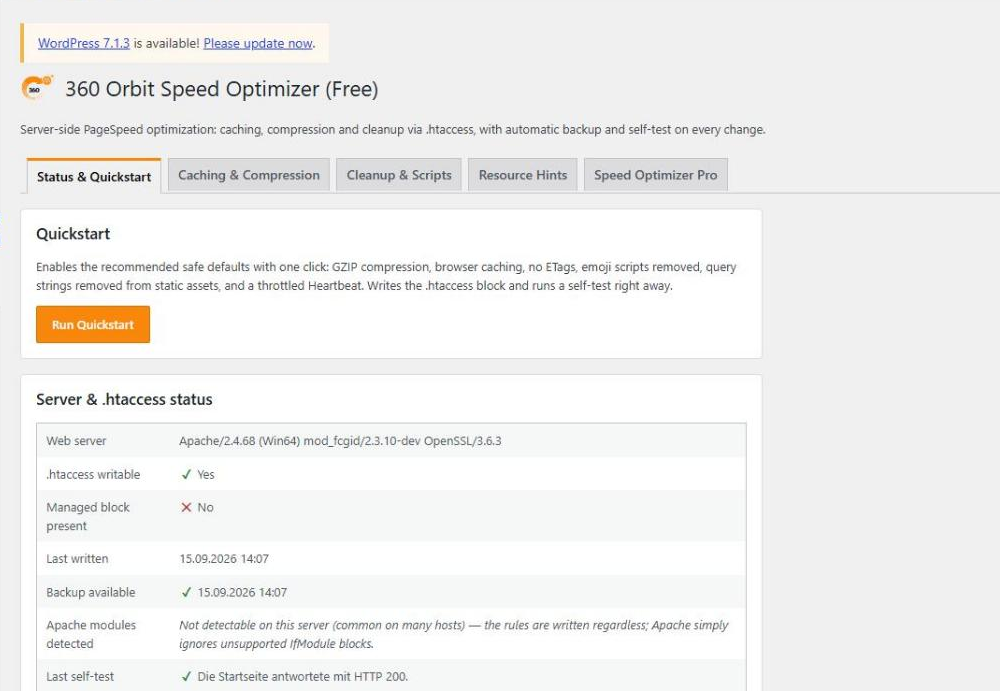
Speed Optimizer adjusts the server settings that Google PageSpeed/Lighthouse regularly flags:
- GZIP/Deflate compression
- Brotli compression (where the web server supports it)
- Browser caching (Expires + Cache-Control) per file type
- Removed ETags
- Removed emoji scripts and query strings on static files
- Throttled Heartbeat API
- Manually maintained preconnect/DNS prefetch hints
- “defer” attribute for scripts via a list of handles
Performance Doctor
The new Performance Doctor tab answers “why is my site slow?” without technical knowledge:
- One click measures a page of your own site: server time, time until the first byte, memory, database queries, the time each plugin, theme and WordPress itself needs, and calls to other servers.
- It explains what it found in plain words with the measured numbers, what you can do, how much effort it is and how risky.
- “The most important steps” on top, a traffic light for each area, and “Done” / “Later” for every recommendation.
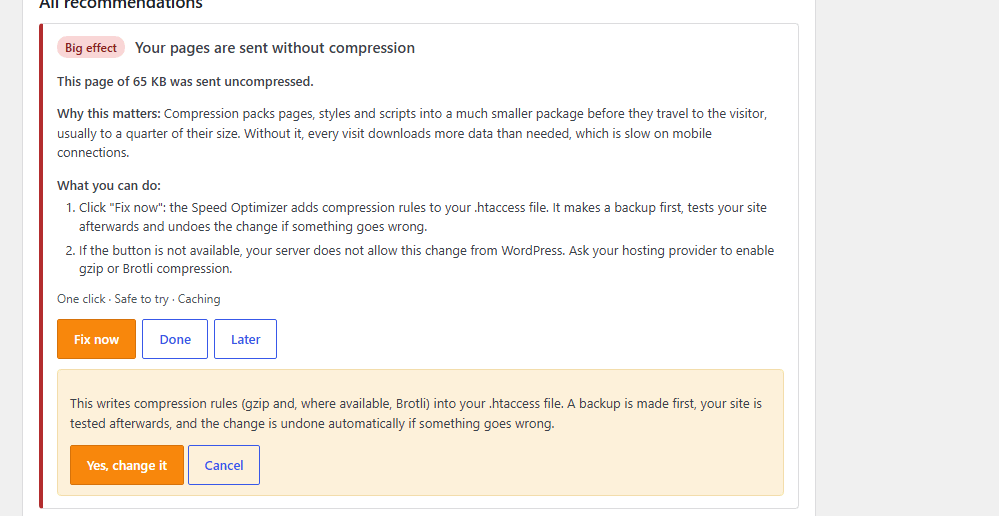
- For compression, browser caching, Heartbeat, emoji scripts and version numbers in file addresses, “Fix now” changes the matching setting through the safe .htaccess mode (backup, self-test, automatic rollback).
- Measure the admin area by hand: switch measuring on for your browser, click through the slow pages, then evaluate.
The Performance Doctor only measures when you ask it to and changes nothing by itself. Database queries are stored without their values.
Every change to .htaccess is backed up automatically beforehand and checked with a self-test afterwards. If the test fails, the plugin automatically rolls back to the last working state. The backup can also be restored manually at any time.
Free version vs. Pro
The free version fully covers compression, caching, the safe .htaccess mode, all cleanup features and the Performance Doctor with 15 recommendations.
Speed Optimizer Pro adds:
- Preload manager for critical resources (images, fonts).
- Automatic delivery of existing WebP/AVIF files to supporting browsers (no conversion; for that, see Media Cleaner Pro).
- Advanced cache rule editor for custom file patterns, e.g. long-term caching of hashed build assets.
- PageSpeed check right in the admin area via the Google PageSpeed Insights API, including a history of recent checks.
- Automatic update notifications right in the WordPress admin area.
- Performance Doctor Pro: all 24 recommendations, a series over several pages with the median, history with before/after comparison, scheduled checks with an e-mail report, reports as a file or printable page, and an optional loader that measures from the first plugin on.
Screenshots



Installation
- Upload the plugin ZIP under Plugins Add New Upload Plugin.
- Activate the plugin.
- In the Speed Optimizer menu, click “Run Quickstart” or configure the settings individually.
FAQ
-
Can a wrong setting take my website down?
-
That is exactly what the safe .htaccess mode protects against: before every change, the previous block is backed up automatically, and afterwards the homepage is requested once. If it responds with a server error, the change is rolled back automatically, without any action on your part.
-
How does the Performance Doctor measure my site?
-
It requests one page of your own website, like a visitor would, and measures that single request. The request carries a one-time key that is valid for five minutes. The result is saved by your server, not sent back in the answer. Nothing leaves your server.
-
Does the Performance Doctor run all the time? Can it slow my site down?
-
No. It only measures when you click “Start check” or switch on measuring for your browser (which ends by itself after 60 minutes). When it is not measuring, it does not hook into your pages and costs no database queries. While measuring, the request takes a little longer than normal, so the numbers are slightly above everyday operation. Visitors are never measured.
-
Does the Performance Doctor change anything on its own?
-
No. It only gives advice. A setting changes only when you click “Fix now” and confirm. Changes to .htaccess go through the safe mode: backup first, self-test afterwards, automatic rollback if your site stops answering.
-
What does the Performance Doctor not measure?
-
It measures the server side: how long your server needs to build a page. It does not measure what happens in the visitor’s browser (layout shifts, image sizes, rendering); for that, use a browser tool. Plugins that load before the Performance Doctor itself are not included in the measurement. Visitors on other devices, other pages and other times of day may see different numbers.
-
The check fails with a message. What now?
-
A password protection, a firewall, maintenance mode or a host that does not allow a site to call itself can stop the automatic check. The message says which one. You can then measure by hand: switch on “Measure this browser” in the Performance Doctor tab, click through the slow pages as an administrator and click “Evaluate”.
-
What happens when I deactivate the plugin?
-
The .htaccess block written by the plugin is removed automatically on deactivation, and the website then runs as it did before the installation.
-
Which languages is the admin area available in?
-
The admin area follows the language set in WordPress. Translations are provided through translate.wordpress.org and you are welcome to contribute one for your language.
Reviews
There are no reviews for this plugin.
Contributors & Developers
“360 Orbit Speed Optimizer” is open source software. The following people have contributed to this plugin.
Contributors
Translate “360 Orbit Speed Optimizer” into your language.
Interested in development?
Browse the code, check out the SVN repository, or subscribe to the development log by RSS.
Changelog
1.1.1
- Changed: the Performance Doctor no longer raises the PHP time limit.