

Description
Are you frustrated by a slow website? Do over-sized images make you say “ewww”… Image optimization with EWWW Image Optimizer helps you make your site faster, improve your bounce rate, and boost your SEO. But most importantly, make your visitors happier so they keep coming back for more.
Why use EWWW Image Optimizer?
Get all this for free:
- Unlimited image optimization to compress images of any size
- Local image optimization mode compatible with most web hosts
- Lossless JPG, PNG, GIF, and SVG image optimization (8% average savings)
- WebP conversion compatible with all web hosts (60% average savings)
- Optimize images from any plugin
- Resize images at upload or in bulk
- Lazy Load with auto-scaling for responsive images–uses properly-sized placeholders to prevent layout shift (CLS)
- Sharpen thumbnail images for better quality
- Adjust JPG and WebP quality (AVIF quality configurable in premium)
- Control creation and optimization of individual WordPress thumbnails
- Convert images to the best format (GIF to PNG, PNG to JPG or vice versa)
- Local image backups
- Preserve GIF animations in thumbnails
- Free email support
EWWW Image Optimizer is the only plugin that lets you optimize images using tools on your own web server (jpegtran, optipng, pngout, pngquant, gifsicle, cwebp). This requires the PHP exec() function and a compatible Linux, Windows, MacOS, or FreeBSD web server. If your web server is not compatible, we offer unlimited lossless JPG image optimization and WebP conversion via our Compress API **for free*.
Upgrade to Premium for:
- 5x premium image optimization
- PDF optimization
- Automatic scaling for all images, even those in external CSS
- One-click WebP & AVIF conversion and delivery
- Enhanced responsive images that use correct dimensions for all devices
- WebP image optimization
- Deliver High-DPI images to devices with 2x and 3x screens (retina)
- Watermark images
- CDN delivery for images, CSS, JS, and fonts with custom domain name option
- 30-day cloud-based backups
- Premium support
Premium plans include SWIS Performance plugin with:
- Page caching
- Enable browser caching with long cache lifetimes
- Defer JS/CSS to eliminate render blocking requests
- Minify JS/CSS
- Critical CSS generation to prevent layout shifting (CLS)
- Optimize font display/self-host Google fonts
- Preload assets like fonts and LCP images
- Reduce unused JS/CSS
- Manage speculative loading
Automatic Everything
Optimize images on your entire site with a single click. With Easy IO CDN, images are automatically compressed, scaled to fit the page and device size, lazy loaded, and converted to next-gen WebP and AVIF formats.
Support
We provide free one-on-one email support to everyone.
Do you have an idea to make EWWW Image Optimizer even better? Share it and vote on future features!
Found a bug? Report the issue on GitHub, and we’ll get it fixed!
You may report security issues through our Patchstack Vulnerability Disclosure Program. The Patchstack team helps validate, triage and handle any security vulnerabilities. Report a security vulnerability.
Bulk Optimize
Optimize images, all from a single page. This includes the Media Library, your theme, and a handful of pre-configured folders (see Optimize Everything Else below). GRAND FlaGallery, NextCellent and NextGEN have their own Bulk Optimize pages.
Optimize Everything Else
Configure any folder within your WordPress install to optimize images. The Bulk Optimizer will compress theme images, BuddyPress avatars, BuddyPress Activity Plus images, Meta Slider slides, WP Symposium Pro avatars, GD bbPress attachments, Grand Media Galleries, and any user-specified folders. You can also use Scheduled optimization or run the optimizer from WP-CLI if that’s more your thing.
Plugin Compatibility
EWWW Image Optimizer has been tested with thousands of plugins and themes, here are just a few of the most common ones: BuddyPress (Activity Plus add-on too), Cloudinary, Easy Watermark, FileBird, FooGallery, GD bbPress Attachments, GRAND FlAGallery, Gmedia Photo Gallery, MediaPress, Meta Slider, Microsoft Azure Storage, MyArcadePlugin, NextGEN Gallery, Regenerate Thumbnails, Weglot, WP Offload Media, WPML, WP Retina 2x, WP RSS Aggregator, WP Symposium, and more…
WebP Images
If you want simple, get automatic WebP conversion with Easy IO, and be done with it! Otherwise, you can generate WebP versions of unlimited images with the Bulk Optimizer. Deliver them to supported browsers with Apache-style rewrite rules, JS WebP Rewriting, or Picture WebP Rewriting. EWWW Image Optimizer even works with the WebP option in the Cache Enabler plugin from KeyCDN.
AVIF Images
AVIF conversion is built into the Easy IO CDN. Once your site is setup with Easy IO, edit the site settings to enable AVIF, and you’re done!
WP-CLI
Allows you to run all batch image processes from the command line, instead of the web interface. Optimize images even faster, run it in ‘screen’ or via regular cron (instead of wp-cron, which can be unpredictable on low-traffic sites). Install WP-CLI from wp-cli.org, and run ‘wp-cli.phar help ewwwio optimize’ for more information or see the Docs.
CDN Support
WP Offload Media is the officially supported (and recommended) plugin for uploads to Amazon S3, Digital Ocean Spaces, and Google Cloud Storage. Check our compatibility list for details on other plugins. All pull mode CDNs like Cloudflare, KeyCDN, Bunny CDN and Sucuri work automatically, but you will need to purge the CDN cache after you optimize images with bulk optimization.
Translations
Huge thanks to all our translators, see the full list!
If you would like to help translate this plugin, join the team.
Signup to receive updates when new strings are available for translation.
Credits
Written by Shane Bishop with special thanks to my Lord and Savior. Based upon CW Image Optimizer, which was written by Jacob Allred at Corban Works, LLC. CW Image Optimizer was based on WP Smush.it. Jpegtran is the work of the Independent JPEG Group. PEL is the work of Martin Geisler, Lars Olesen, and Erik Oskam. Easy IO and HTML parsing classes based upon the Photon module from Jetpack.
Screenshots
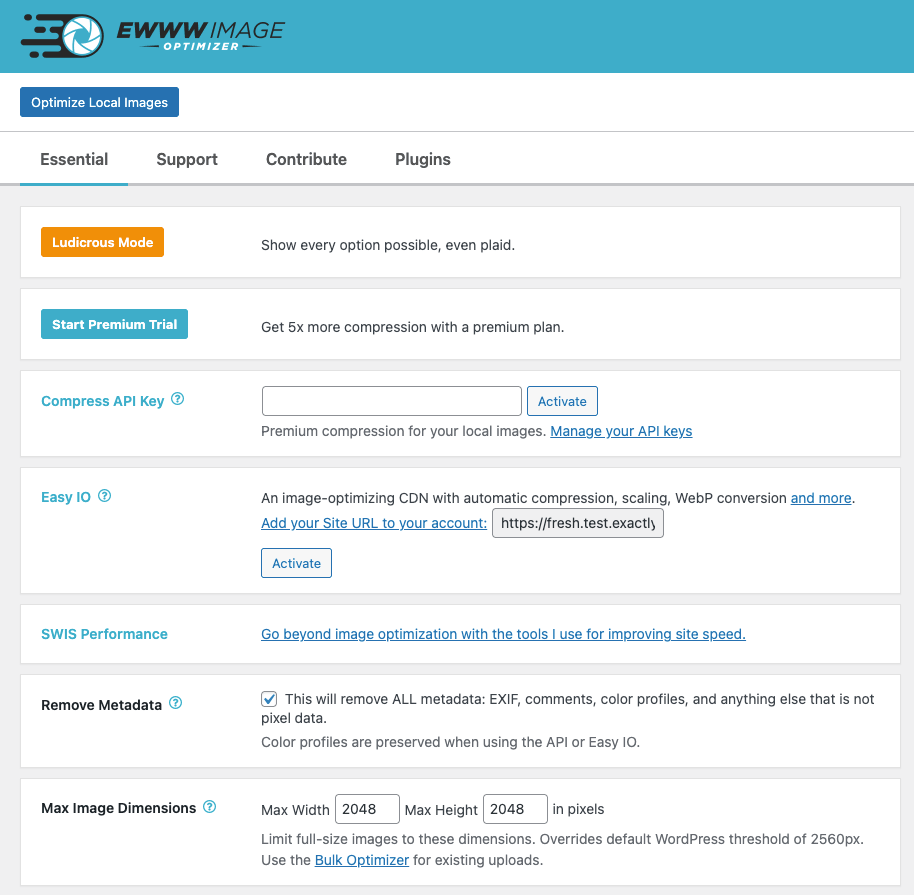
Plugin settings page. 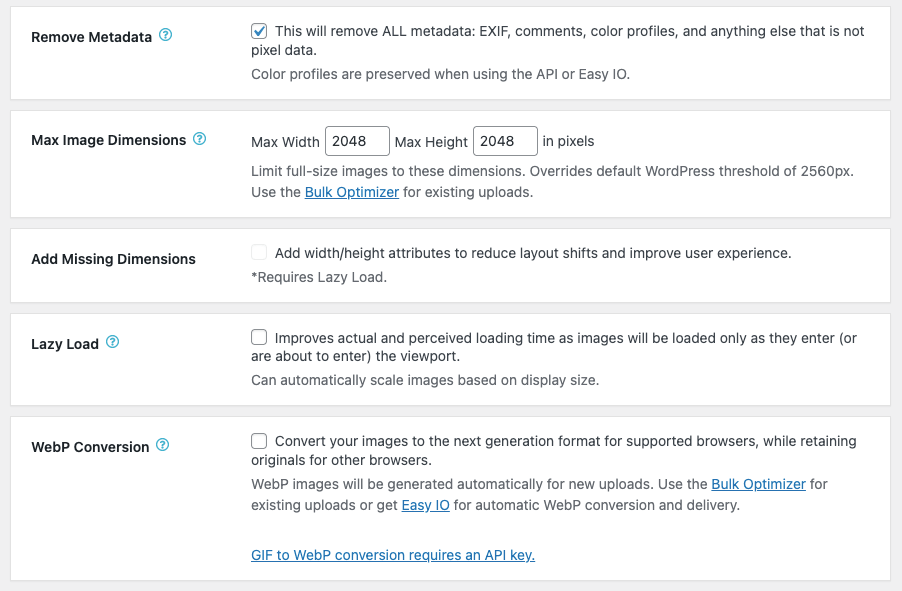
More settings. 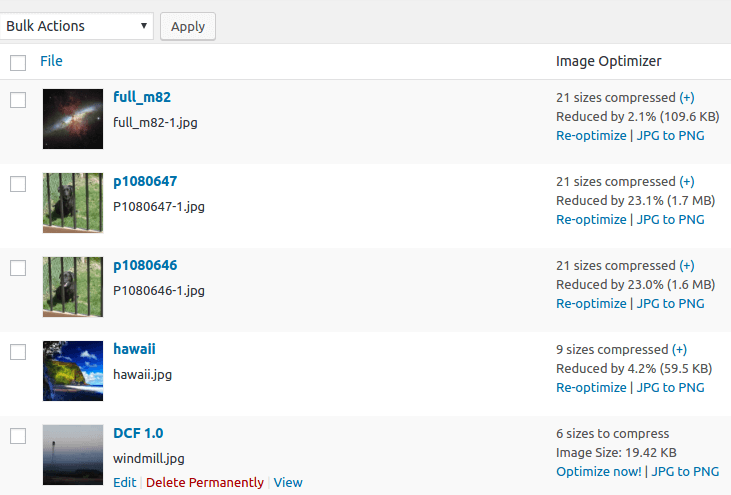
Additional optimize column added to media listing. You can see your savings, manually optimize individual images, and restore originals (converted only). 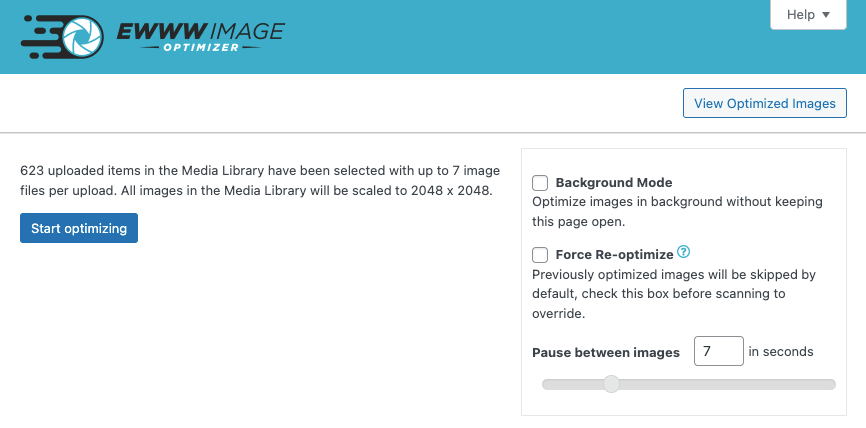
Bulk optimization page. You can optimize all your images at once and resume a previous bulk optimization.
Installation
- The plugin will attempt to install jpegtran, optipng, and gifsicle automatically for you. This requires that the wp-content folder is writable by the user running the web server.
- If the binaries don’t run locally, you may sign up for cloud-based optimization: https://ewww.io/plans/
- Visit the settings page to customize the plugin for your site.
- Recommended Activate the Easy IO CDN and/or run the bulk process to compress your existing images.
- Done!
If these steps do not work, see the additional documentation. If you need further assistance using the plugin, please visit our Support Page.
Webhosts
To find out if your webhost works with the EWWW Image Optimizer, you can check the official list.
FAQ
-
Does the plugin remove EXIF and/or IPTC metadata?
-
EWWW Image Optimizer will remove metadata by default, but if you need to keep the EXIF/IPTC data for copyright purposes, you can disable the Remove Metadata option.
EXIF data does not impact SEO, and it is recommended by Google (and just about everyone else) to remove EXIF data. -
Google Pagespeed says my images need compressing or resizing, but I already optimized all my images. What do I do?
-
Try this for starters: https://docs.ewww.io/article/5-pagespeed-says-my-images-need-more-work
-
The plugin complains that I’m missing something, what do I do?
-
This article will walk you through installing the required tools (and the alternatives if installation does not work): https://docs.ewww.io/article/6-the-plugin-says-i-m-missing-something
-
Does the plugin replace existing images?
-
Yes, but only if the optimized version is smaller. The plugin should NEVER create a larger image.
-
Can I lower the compression setting for JPGs to save more space?
-
Our premium compression can determine the ideal quality setting and give you the best results, but you may also adjust the default quality for conversion and resizing. Read more…
-
The bulk optimizer doesn’t seem to be working, what can I do?
-
See https://docs.ewww.io/article/39-bulk-optimizer-failure for full troubleshooting instructions.
-
What are the supported operating systems?
-
Free mode using local server compression is supported on Windows, Linux, MacOS, and FreeBSD. The Compress API and Easy IO CDN will work on any OS.
-
I want to know more about image optimization, and which options I should choose.
-
That’s not a question, but since I made it up, I’ll answer it. See this resource:
https://ewww.io/2026/01/12/ewww-whose-images-are-those/
Reviews


Contributors & Developers
“EWWW Image Optimizer” is open source software. The following people have contributed to this plugin.
Contributors
“EWWW Image Optimizer” has been translated into 29 locales. Thank you to the translators for their contributions.
Translate “EWWW Image Optimizer” into your language.
Interested in development?
Browse the code, check out the SVN repository, or subscribe to the development log by RSS.
Changelog
- Feature requests can be viewed and submitted on our feedback portal
- If you would like to help translate this plugin in your language, join the team
8.5.0
Release Date – April 1, 2026
- changed: foreground/background bulk optimizers merged into common interface on both Settings and Bulk Optimizer pages
- added: option to choose Background or Foreground mode during bulk optimization
- added: Choose whether to include Additional Folders like the theme or other configured folders during bulk optimization
- fixed: some strings in bulk interface not able to be translated properly for RTL locales
- fixed: NextGEN bulk optimizer missing from menu with NextGEN 4.x
- fixed: when media is offloaded, background optimization leaves local copies behind in some rare cases
- fixed: existing images with missing thumbs/sizes do not get properly offloaded by WP Offload Media after bulk optimization
- fixed: list of pending images for bulk optimization sorted incorrectly
- deprecated: direct support for GRAND FlaGallery will be removed soon, use Folders to Optimize setting instead
- deprecated: direct support for NextCellent Gallery will be removed soon, use Folders to Optimize setting instead
8.4.1
Release Date – February 19, 2026
- fixed: PHP warnings with offloaded media in the Media Library
- fixed: WebP naming mode unable to be changed on Cloudflare sites
- fixed: incorrect WebP paths generated for images in root of S3 buckets (S3 Image Optimizer compat)
- fixed: JS/Picture WebP uses incorrect URLs after naming mode is changed and existing .webp files have not been renamed
8.4.0
Release Date – February 11, 2026
- added: ability to choose append or replace for naming of WebP images, props @adamewww
- added: detection for GoDaddy managed WP hosting
- improved: WebP renaming tool for converting from replacement naming to append and vice versa
- fixed: WebP deletion tool does not update database records, props @adamewww
- fixed: Lazy Load setting does not detect presence of Easy IO plugin
- fixed: Easy IO domain not reset after site URL is updated
- fixed: PHP warnings and notices
8.3.1
Release Date – December 4, 2025
- changed: prevent use of deprecated seems_utf8() function on WP 6.9+
- fixed: Lazy Load auto-sizing makes images too small when screen size changes
- fixed: failure to decode CSS background images contained in encoded quotes (')
8.3.0
Release Date – November 19, 2025
- added: Lazy Load support for background images in external CSS files
- added: View CDN bandwidth usage on settings page
- changed: Lazy Load checks parent element for skip-lazy class
- changed: Lazy Load auto-sizing honors High DPI setting
- changed: Easy IO fills in 450px wide image when responsive (srcset) images have a gap
- changed: Easy IO premium setting moved to zone configuration at https://ewww.io/manage-sites/
- improved: Lazy Load performance when searching for img elements
- improved: Lazy Load placeholder generation is faster and works better with Safari
- fixed: Lazy Load for iframes breaks WP Remote Users Sync plugin
- fixed: PHP warning when attempting conversion of custom thumbnails from certain themes
8.2.1
Release Date – August 27, 2025
- added: filters for cloud storage plugin integration
- fixed: Easy IO misses some preload links
- fixed: PHP error when API quota is exhausted during single image optimization
8.2.0
Release Date – July 15, 2025
- added: JS WebP support for HTML elements/tags added via eio_allowed_background_image_elements filter
- added: Easy IO support for dynamic cropping (crop=1) on WordPress.com sites
- changed: use native ImageMagick methods to detect, and correct, paletted PNG thumbnails
- changed: use authoritative classmap via composer to speed up autoloader, props @nlemoine
- changed: streamlined admin notices
- fixed: indexed PNG thumbnails with 8-bit alpha are distorted by quantization
- fixed: PHP warnings related to HTML parsing
- fixed: missing ImageMagick information on Site Health screen
- fixed: PHP warnings when link URLs contain special regex characters
8.1.4
Release Date – May 15, 2025
- added: customize lossy PDF compression by defining EWWW_IMAGE_OPTIMIZER_PDF_IMAGE_DPI and/or EWWW_IMAGE_OPTIMIZER_PDF_IMAGE_QUALITY
- fixed: WebP thumbnails have incorrect orientation when created from the original unoptimized image
8.1.3
Release Date – March 26, 2025
- added: exclude private BuddyBoss media from Easy IO with page:buddyboss exclusion
- changed: WebP Only mode no longer requires Force Re-optimize for already optimized images
- fixed: Easy IO rewriting some URLs when full page exclusions are used
- fixed: WebP rewriters alter PNG URLs when PNG to WebP conversion is unavailable
- fixed: regression in compatibility with plugins that recreate images via WP_Image_Editor
- fixed: previous fix to avoid translation notices caused errors with other plugins calling background processes earlier than ‘init’
8.1.2
Release Date – March 6, 2025
- changed: WebP Conversion mode configurable for API users
- changed: combine metadata queries for faster async scanning
- changed: Bulk Optimization no longer requires Force Re-optimization to create WebP images for previously optimized images
- fixed: background processes trigger notice from loading translations too early
- fixed: WooCommerce thumb regen still runs when WC sizes are disabled
- fixed: Easy IO fails to refresh CDN domain when site URL has changed
- fixed: Force and WebP Only options not applied when scanning additional folders in async mode
- fixed: PDF and SVG images queued in WebP Only mode
8.1.1
Release Date – February 26, 2025
- changed: added handling of HTTP errors to processes on Tools page
- changed: added nonce-renewal for long-running processes on Tools page
- changed: improved output for WebP Cleanup tool and Delete Converted Originals tool
- fixed: queue table upgrade fails to add ‘id’ column
8.1.0
Release Date – February 18, 2025
- added: Preserve Originals option to keep pre-scaled images for WebP and thumbnail generation
- added: ability for 3rd party plugins to hook into Lazy Load and WebP HTML parsers
- changed: ImageMagick is default WebP conversion method on supported servers
- changed: improved performance of custom *_option functions on multisite
- changed: Max Image Dimensions always override WP big_image threshold
- changed: local image backups not removed on plugin deactivation
- fixed: Sharpen Images not applied to new WebP Conversion process
- fixed: WebP Quality not applied to ImageMagick WebP Conversion for thumbnails
- fixed: WebP resizing overrides custom crop set by Crop Thumbnails
- fixed: pre-scaled original cannot be found if attachment metadata is incomplete
- fixed: PHP error in bulk image scanner
Earlier versions
Please refer to the separate changelog.txt file.