
Description
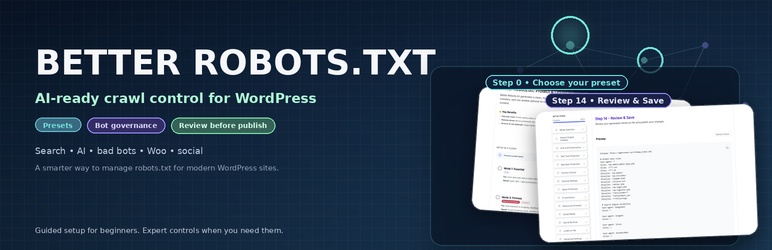
Better Robots.txt replaces the default WordPress robots.txt workflow with a smarter, structured version you can configure and preview before publishing.
Instead of a blank textarea, you get a guided wizard with presets, plain-language explanations, and a final Review & Save step so you can inspect the generated robots.txt before it goes live.
Built for beginners and advanced users alike, Better Robots.txt helps you control how search engines, AI crawlers, SEO tools, archive bots, bad bots, social preview bots, and other automated agents interact with your site.
Trusted by thousands of WordPress sites, Better Robots.txt is designed for the AI era without resorting to hype, vague promises, or hidden rules.
Better Robots.txt is available in Free, Pro, and Premium editions. The free plugin covers the guided workflow and essential crawl control features, while Pro and Premium unlock additional governance, protection, and AI-ready modules. Some screenshots on the plugin page show features from all three editions.
A quick overview
Why Better Robots.txt is different
Most robots.txt plugins fall into one of three categories:
- Simple text editor
- Virtual robots.txt manager
- Single-purpose AI or policy add-on
Better Robots.txt goes further.
It gives you a complete, guided crawl control workflow so you can:
- Choose a preset that matches your goals
- Control major crawler categories without writing everything by hand
- Keep core WordPress protection rules visible and editable
- Clean up low-value crawl paths that waste crawl budget
- Generate a cleaner robots.txt output
- Preview the final result before saving
What you can control
Better Robots.txt helps you manage:
- Search engine visibility
- AI and LLM crawler behavior
- AI usage signals such as search, ai-input, and ai-train preferences
- SEO tool crawlers
- Bad bots and abusive crawlers
- Archive and Wayback access
- Feed crawlers and crawl traps
- WooCommerce crawl cleanup
- CSS, JavaScript, and image crawling rules
- Social media preview crawlers
- ads.txt and app-ads.txt allowance
- llms.txt generation
- Advanced directives such as crawl-delay and custom rules
- Final review before publishing
Editions
Better Robots.txt is available in three editions:
- Free – Includes the guided setup, the Essential preset, core crawl control features, and the final Review & Save workflow.
- Pro – Adds more advanced governance and protection modules, including additional AI, crawler, and cleanup controls.
- Premium – Unlocks the most restrictive and advanced protection options, including the Fortress preset and additional high-control modules.
Some options shown in the interface are marked Free, Pro, or Premium so users can immediately understand which modules belong to each edition.
Presets
Setup starts with four modes:
- Essential – A clean, practical configuration for most websites that want a better robots.txt without complexity.
- AI-First – For publishers and content sites that want AI-ready governance without shutting down discovery.
- Fortress – For websites that want stronger protection against scraping, archive capture, and unnecessary crawl activity.
- Custom – For users who prefer to configure each module manually.
For many sites, one preset plus a quick review is enough.
Built for beginners and experts
Beginners get:
- A guided setup instead of a raw robots.txt box
- Preset-based configuration
- Plain-language explanations for important choices
- A safer workflow with a final preview step
Advanced users get:
- Editable core WordPress protection rules
- Fine-grained crawler controls by category
- WooCommerce-oriented cleanup options
- Consolidated output options
- Advanced directives and custom rules
- A final output they can inspect before publishing
AI-ready, without hype
Better Robots.txt includes features for modern AI-related crawl governance, including:
- AI crawler handling
- Optional llms.txt support
- AI usage signals for compliant systems
- Optional machine-readable governance signals for advanced use cases
These features help you express how you want automated systems to use your content.
However, Better Robots.txt does not claim to control AI by force. Like robots.txt itself, these signals are most useful with compliant systems and good-faith crawlers.
What Better Robots.txt is
Better Robots.txt is:
- A robots.txt governance plugin for WordPress
- A guided configuration workflow instead of a raw text editor
- A crawl control layer to reduce wasteful crawling
- A practical bridge between SEO, crawl hygiene, and AI-era policy signaling
- A way to keep your crawl policy clearer for humans and machines
Technical reference for advanced users: Better Robots.txt also maintains a public GitHub repository with product definition, governance notes, and machine-readable artefacts.
What Better Robots.txt is not
Better Robots.txt is not:
- A firewall or Web Application Firewall (WAF)
- An anti-scraping enforcement engine
- A legal compliance engine
- A guarantee that every bot will obey your rules
- A replacement for server-level security or access control
It helps you publish a clearer crawl policy.
It does not replace infrastructure-level protection.
Typical use cases
Use Better Robots.txt if you want to:
- Clean up a weak or noisy default robots.txt
- Reduce crawl waste on WordPress or WooCommerce
- Keep major search engines allowed while restricting other bots
- Control whether archive bots can snapshot your site
- Publish AI usage preferences more clearly
- Keep social preview bots allowed while limiting scrapers
- Review the final file before making it live
Key Features
- Guided step-by-step wizard
- Preset-based setup: Essential, AI-First, Fortress, Custom
- Search engine visibility controls
- AI and LLM crawler governance
- AI usage signals support
- SEO tool crawler controls
- Bad bot and abusive crawler options
- Archive and Wayback access controls
- Spam, feed, and crawl trap cleanup
- WooCommerce crawl cleanup options
- CSS, JavaScript, and image crawling rules
- Social media preview crawler controls
- ads.txt and app-ads.txt allowance
- Optional llms.txt generation
- Consolidated output option
- Core WordPress protection rules remain visible and editable
- Final Review & Save preview screen
About the publisher
Better Robots.txt is developed and maintained by Pagup, a digital readability firm based in Quebec, Canada. Pagup helps organizations become correctly understood by search engines, generative AI systems, and autonomous agents.
The robots.txt file is the first surface that AI crawlers read when they discover a site. A well-structured robots.txt that references governance files such as llms.txt, ai-manifest.json, and interpretation policies helps AI systems understand your site faster and more accurately.
Better Robots.txt is one component of a broader digital readability practice that includes semantic content architecture, AI governance and machine readability, and interpretive SEO.
Part of the Pagup ecosystem
- pagup.com — Digital readability firm. Diagnostic, semantic architecture, AI governance.
- gautierdorval.com — Doctrine, canonical definitions, interpretive governance research.
- interpretive-governance.org — Formal versioned standard for interpretive governance.
- better-robots.com — Documentation and resources for Better Robots.txt.
Screenshots
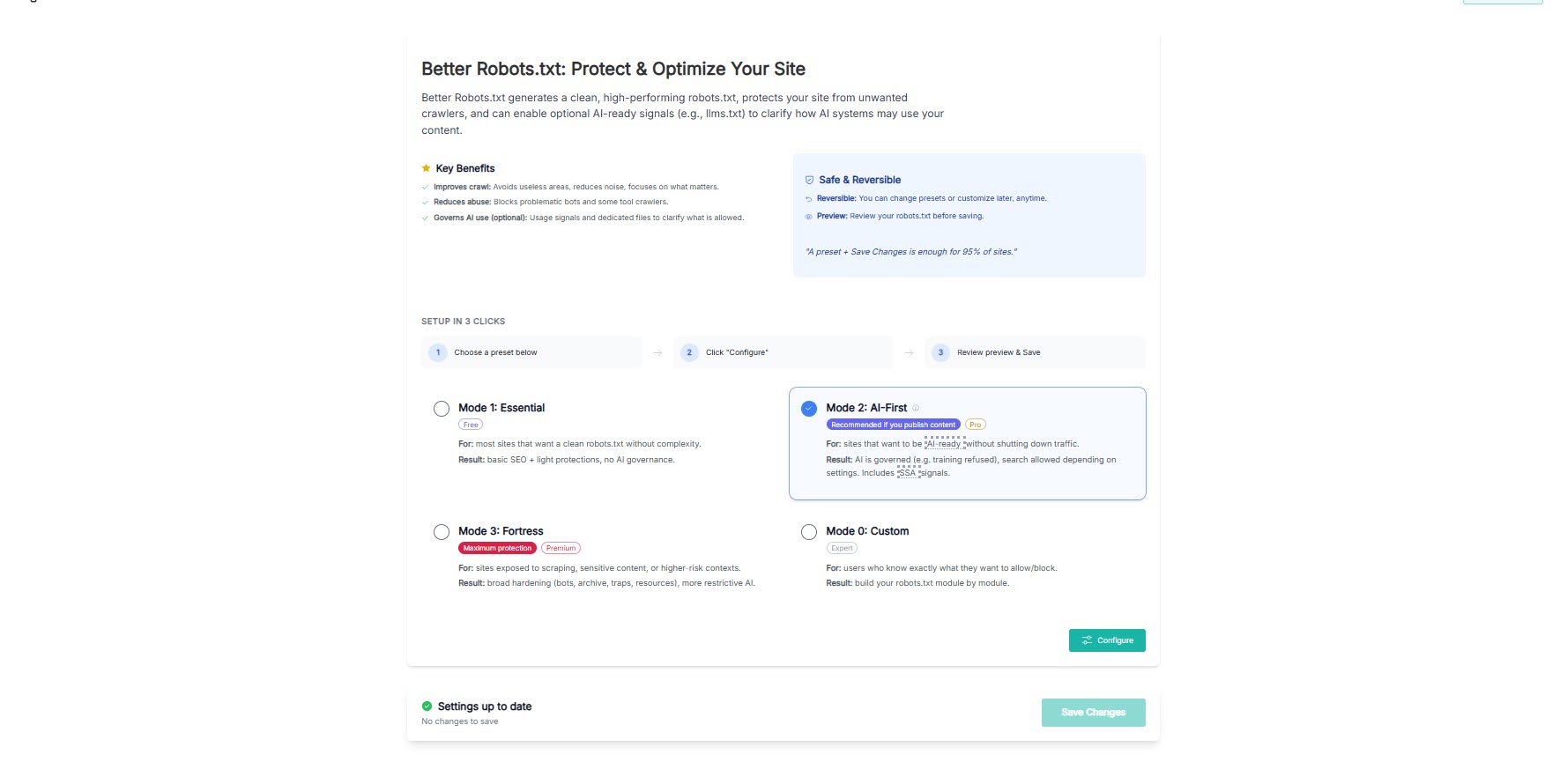
Step 0 – Preset selection with product introduction and setup guidance. 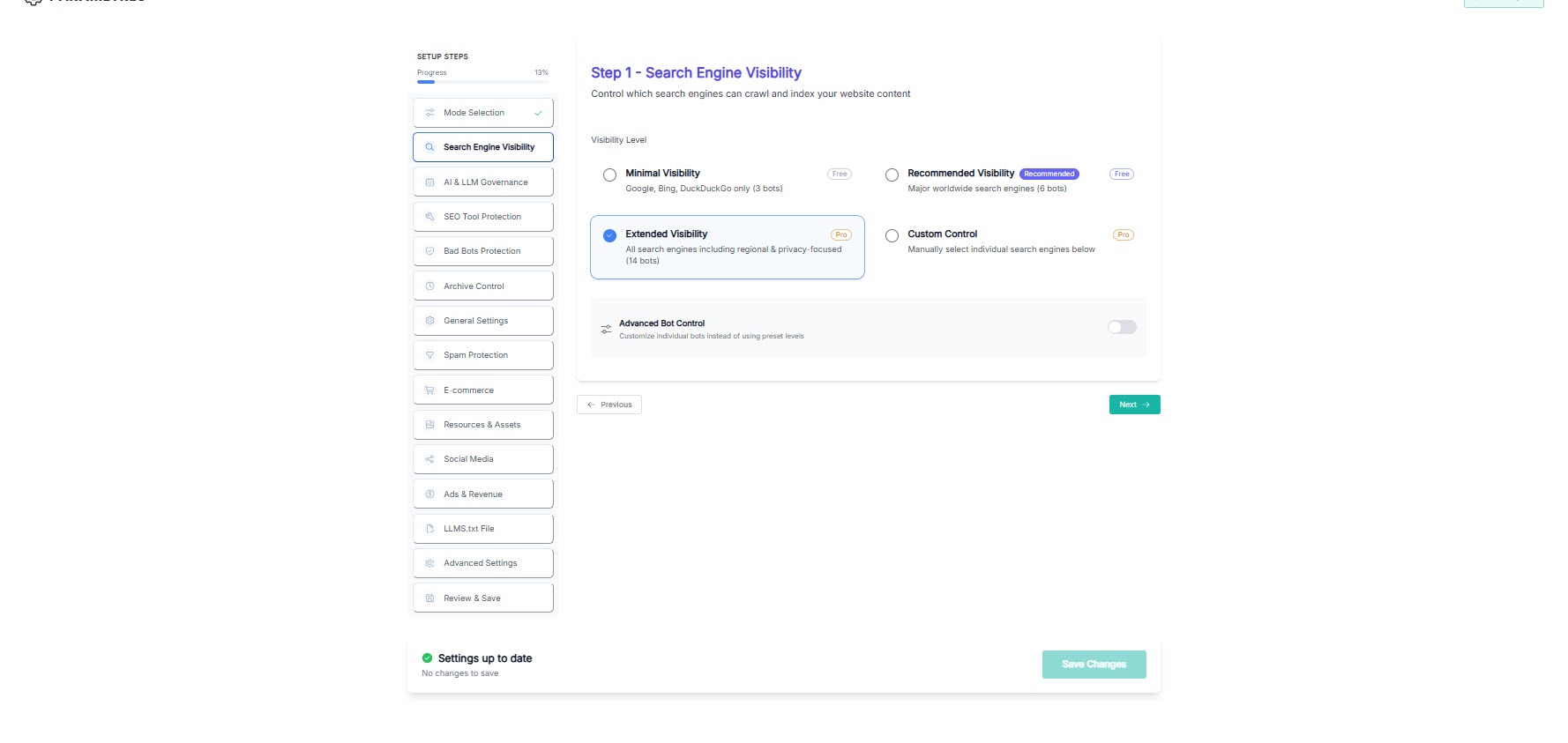
Step 1 – Search engine visibility controls. 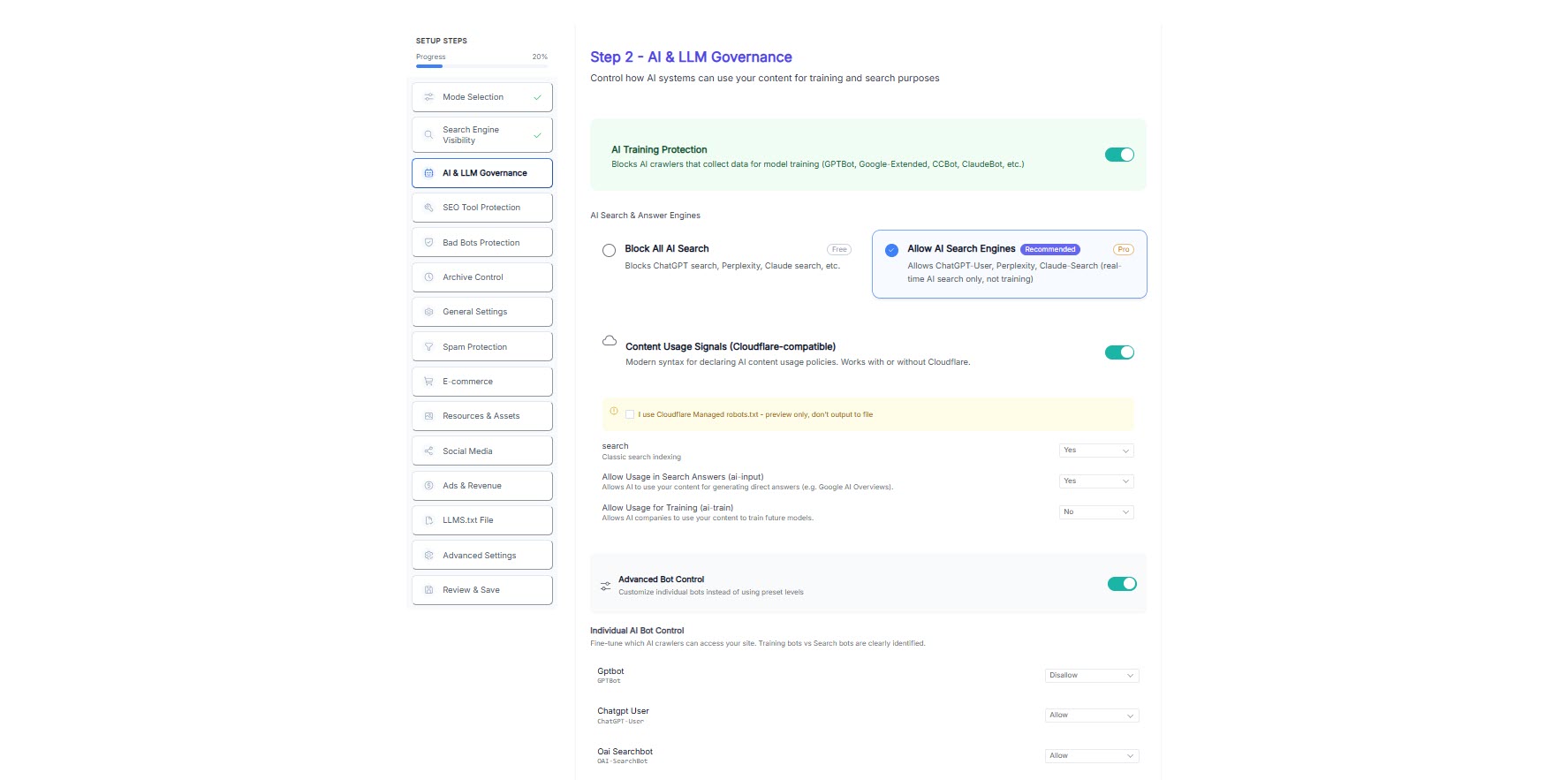
Step 2 – AI and LLM governance settings. 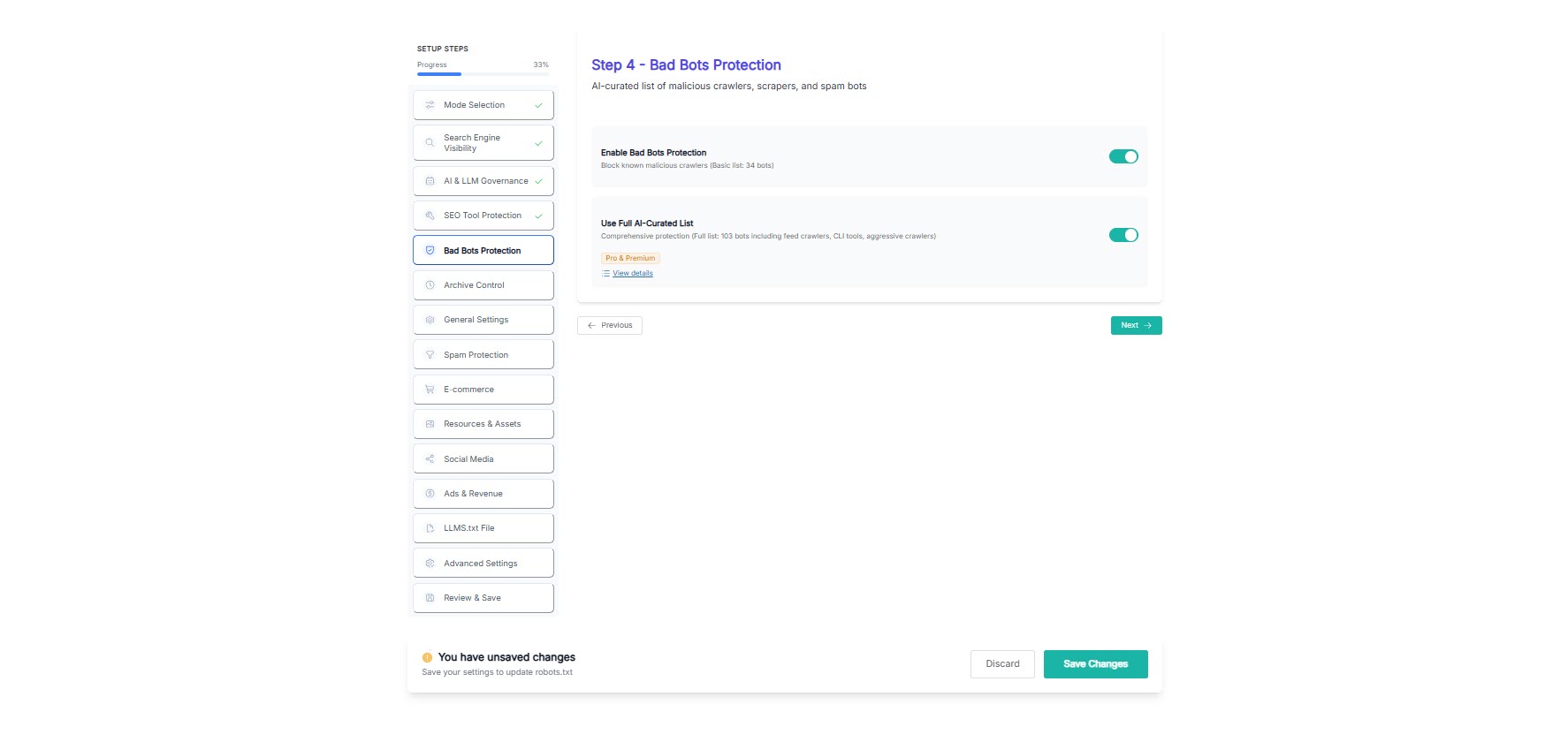
Step 4 – Bad bot protection options. 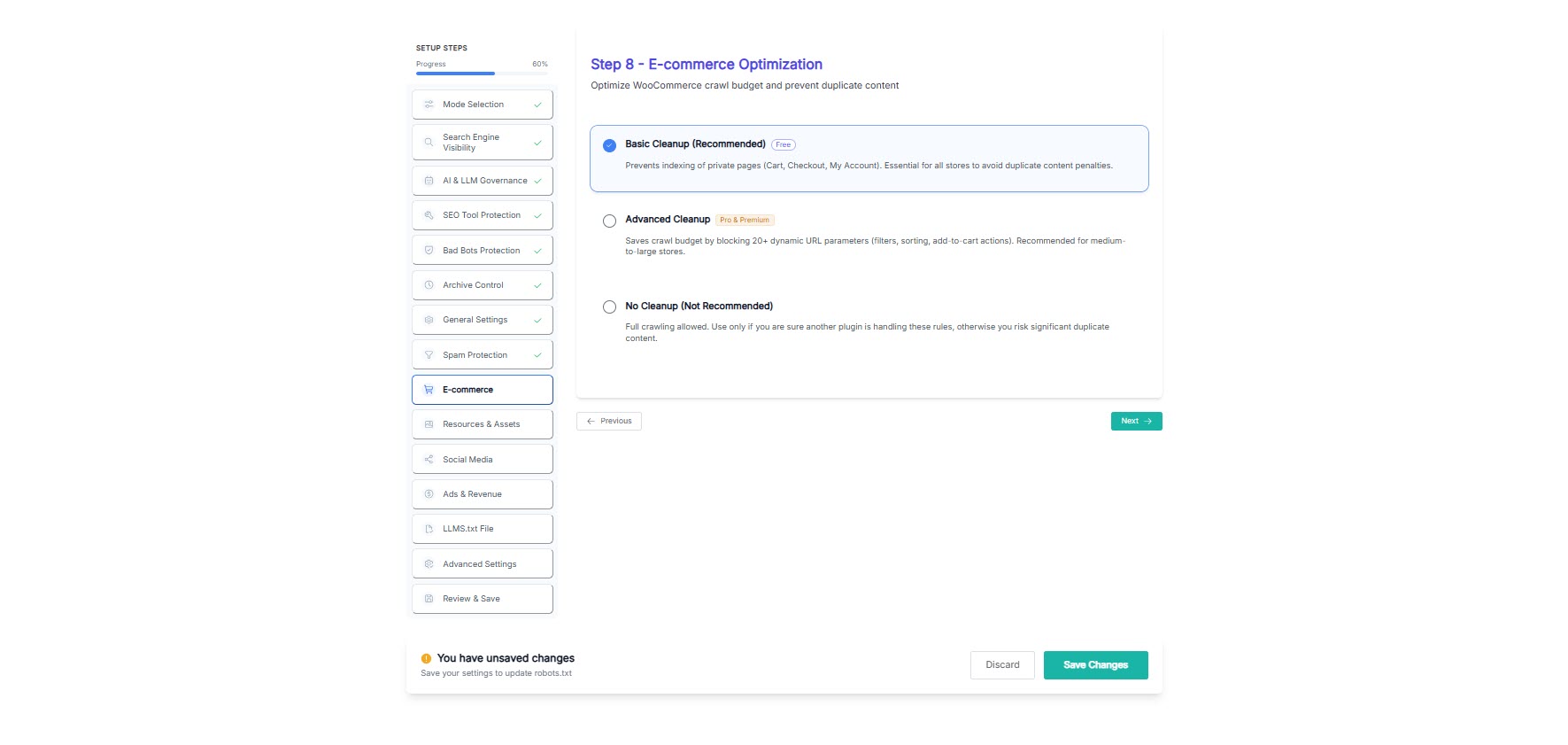
Step 8 – WooCommerce cleanup settings. 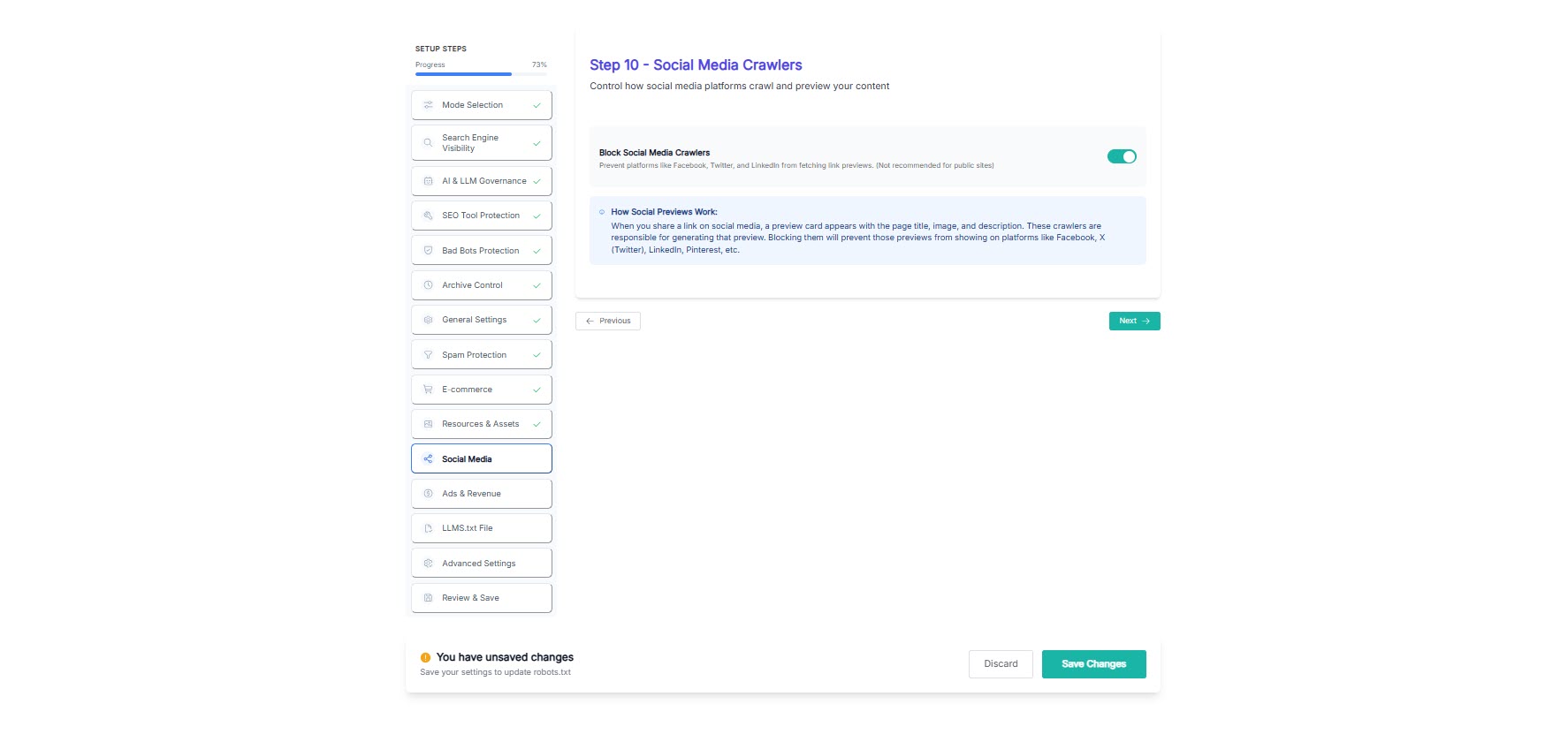
Step 10 – Social media crawler controls. 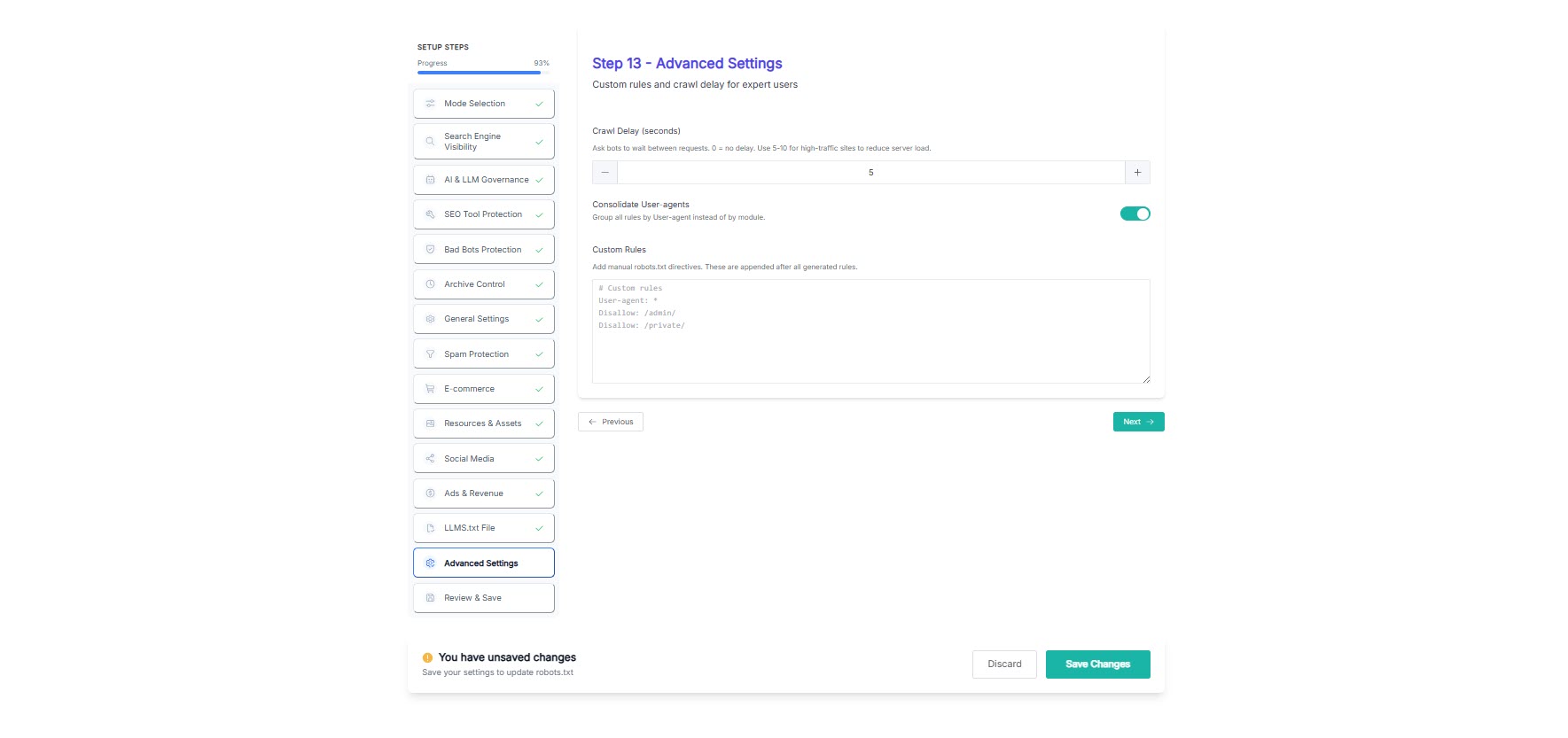
Step 13 – Advanced settings and output options. 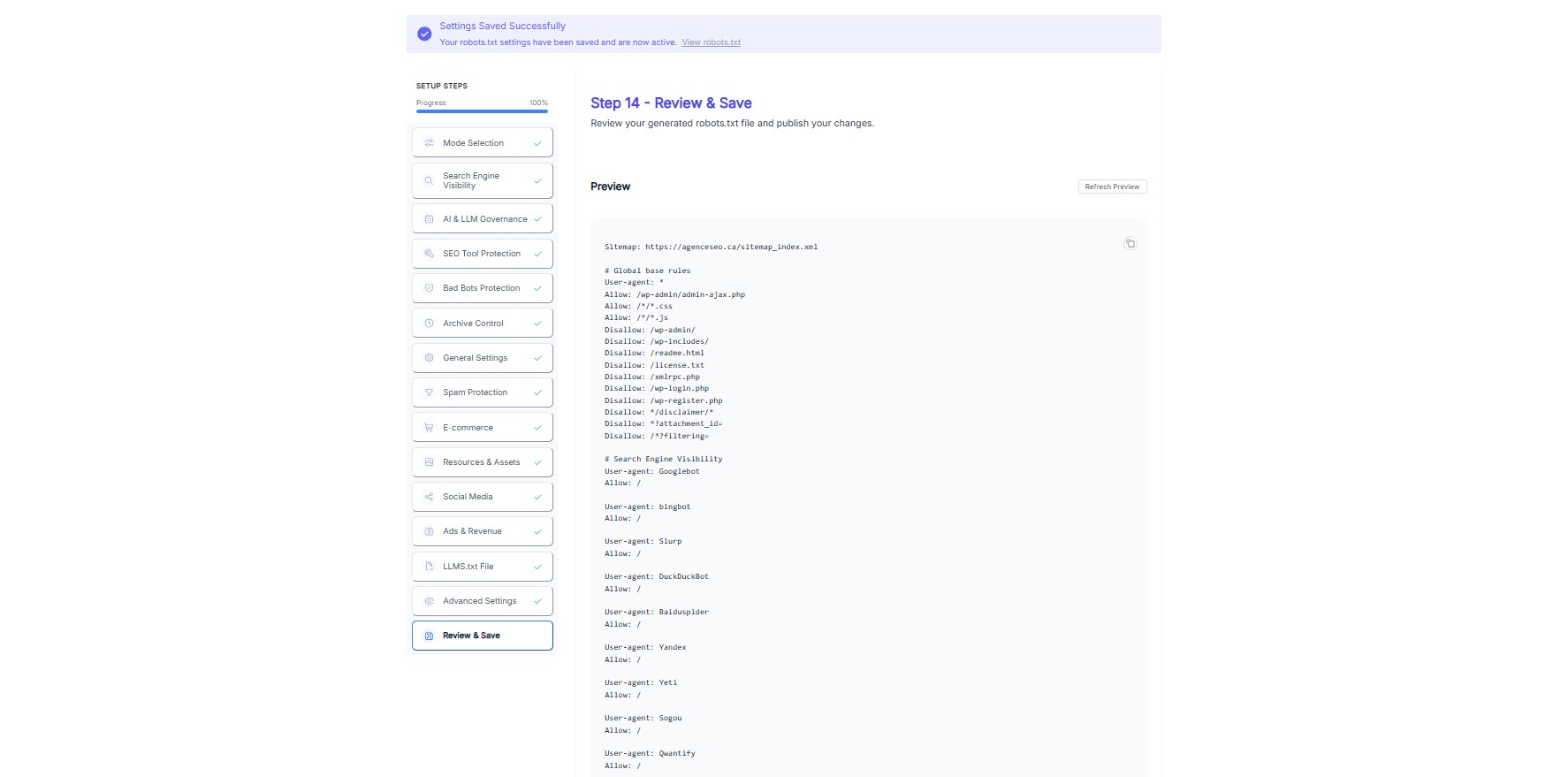
Step 14 – Review & Save preview screen.
Installation
- Upload the plugin files to the /wp-content/plugins/better-robots-txt/ directory, or install Better Robots.txt through the WordPress Plugins screen.
- Activate the plugin through the Plugins screen in WordPress.
- Open the Better Robots.txt settings page from your WordPress dashboard.
- Choose a preset or configure each module manually.
- Follow the wizard until the final Review & Save step.
- Review the generated robots.txt preview.
- Save your changes.
FAQ
-
Does this plugin create or manage robots.txt?
-
Yes. Better Robots.txt generates and manages your WordPress robots.txt through a guided interface, with a preview before you apply changes.
-
Is this only for advanced users?
-
No. The plugin is designed for both beginners and advanced users. Presets make the first setup easy, while experts can fine-tune individual modules and directives.
-
Can I preview the result before saving?
-
Yes. The final Review & Save step shows you the generated robots.txt before you publish it.
-
Can I block AI crawlers?
-
You can configure how AI-related crawlers and tools are treated and publish AI usage preferences. Respect and enforcement still depend on each crawler’s behavior, just like with robots.txt.
-
Does llms.txt guarantee that AI systems will follow my rules?
-
No. llms.txt and similar policy signals help you express intent more clearly, but they are not a hard technical barrier.
-
Can I keep search engines allowed while restricting other bots?
-
Yes. Better Robots.txt helps you differentiate between crawler categories instead of using a simple all-or-nothing approach.
-
Can I change preset decisions later?
-
Yes. Presets are a starting point. You can revisit the settings page, adjust modules, and regenerate your robots.txt at any time.
-
Are all screenshots from the free version?
-
No. The screenshots reflect the current product family and may include Free, Pro, and Premium features. Features marked Pro or Premium in the interface require a paid edition.
-
Is the free version still useful on its own?
-
Yes. The free edition includes the guided workflow, essential crawl control, and the final preview step. Pro and Premium are for sites that need broader governance and stricter protection.
-
Does this plugin help WooCommerce sites?
-
Yes. Better Robots.txt includes WooCommerce-related cleanup options to reduce unnecessary crawling of dynamic, low-value, or duplicate URLs.
-
Who develops Better Robots.txt?
-
Better Robots.txt is developed by Pagup, a digital readability firm based in Quebec, Canada. Pagup specializes in helping organizations become correctly readable by search engines, AI systems, and autonomous agents.
-
Why does robots.txt matter for AI readability?
-
Your robots.txt is the first file that AI crawlers read when they visit your site. It determines what content they can access and what governance signals they discover. In 2026, AI systems such as ChatGPT, Perplexity, Gemini, and autonomous agents rely on robots.txt to understand how to interact with your site. A robots.txt that references your llms.txt, ai-manifest.json, and governance policies helps these systems interpret your organization more accurately.
Learn more about AI governance and machine readability and why digital readability goes beyond traditional SEO.
-
What is digital readability?
-
Digital readability is the capacity of a website to be correctly understood by all four reading layers: humans, search engines, generative AI systems, and autonomous agents. Traditional SEO addresses only the search engine layer. Digital readability covers all four. Learn more at pagup.com.
Reviews


Contributors & Developers
“Better Robots.txt – AI-Ready Crawl Control & Bot Governance” is open source software. The following people have contributed to this plugin.
Contributors


“Better Robots.txt – AI-Ready Crawl Control & Bot Governance” has been translated into 3 locales. Thank you to the translators for their contributions.
Translate “Better Robots.txt – AI-Ready Crawl Control & Bot Governance” into your language.
Interested in development?
Browse the code, check out the SVN repository, or subscribe to the development log by RSS.
Changelog
1.0.0
- Initial release.
1.0.1
- fixed plugin directory url issue
- some text improvements
1.0.2
- fixed some minor issues with styling
- improved text and translation
1.1.0
- added some major improvements
- allow/off option changed with allow/disallow/off
- improved overall text and french translation
1.1.1
- fixed a bug and improved code
1.1.2
- added new feature “Spam Backlink Blocker”
1.1.3
- fixed a bug
1.1.4
- added new “personalize your robots.txt” feature to add custom signature
- added recommended seo tools to improve search engine optimization
1.1.5
- added feature to detect physical robots.txt file and delete it if server permissions allows
1.1.6
- added russian and chinese (simplified) languages
- fixed bug causing redirection to better robots.txt settings page upon activating other plugins
1.1.7
- added new feature: Top plugins for SEO performance
- fixed plugin notices issue to dismiss for define period of time after being closed
- fixed stylesheet issue to get proper updated file after plugin update (cache buster)
- added spanish and portuguese languages
1.1.8
- added new feature: xml sitemap detection
- fixed translations
1.1.9
- added new feature: loading performance for woocommerce
1.1.9.1
- fixed a bug in disallow rules for woocommerce
1.1.9.2
- boost your site with alt tags
1.1.9.3
- fixed readability issues
1.1.9.4
- fixed default robots.txt file issue upon plugin activation for first time
- fixed php error upon saving settings and permalinks
- refactored code
1.1.9.5
- added clean-param for yandex bot
- ask backlinks feature for pro users
- avoid crawler traps feature for pro users
- improved default robots.txt rules
1.1.9.6
- added 150+ growth hacking tools
- fixed layout bug
- updated default rules
1.2.0
- Added Post Meta Box to Disable Indivdual post, pages and products (woocommerce pro only). It will add Disallow and Noindex rule in robots.txt for any page you choose to disallow from post meta box options.
1.2.1
- Added multisite feature for directory based network sites (pro only). it can duplicate all default rules, yoast sitemap, woocommerce rules, bad bots, pinterest bot blocker, backlinks blocker etc with a single click for all directory based network sites.
- Added version timestamp for wp_register_script ‘assets/rt-script.js’
1.2.2
- Fixed some bugs creating error in google search console
- Text improvement
1.2.3
- Added “Hide your robots.txt from SERPs” feature
- Text improvements
1.2.4
- Fixed a bug
- Text improvements
1.2.5
- Fixed crawl-delay issue
- Updated translations
1.2.5.1
- Fixed a minor issue
1.2.6
- Security patched in freemius sdk
1.2.6.1
- Fixed Multisite Issue for pro users
1.2.6.2
- Fixed Yoast sitemap issue for Multisite users
1.2.6.3
- Fixed some text
1.2.7
- Added Baidu/Sogou/Soso/Youdao – Chinese search engines features for pro users
- Added social media crawl feature for pro users
1.2.8
- Notification will be disabled for 4 months. Fixed some other minor stuff
1.2.9.2
- Updated Freemius SDK v2.3.0
- BIGTA recommendation
1.2.9.3
- Fixed Undefined index error while saving MENUS for some sites
- Removed “noindex” rule for individual posts as Google will stop supprting it from Sep 01 2019
1.3.0
- Added 5 new rules to default config. Removed 4 old default rules which were cuasing some issues with WPML
- Added a search rule to Avoid crawling traps
- Added several new rules to Spam Backlink Blocker
- Fixed security issues
1.3.0.1
- VidSEO recommendation
1.3.0.2
- Fixed some security issues
- Added new rules to Backlink Protector (Pro only)
- Multisite notification will be disabled permenantly once dismissed
1.3.0.3
- Fixed php notice (in php log) for $host_url variable
1.3.0.4
- Fixed php notice (in php log) for $active_tab variable
- Fixed some typos
1.3.0.5
- Added option to Be part of our worldwide Movement against CoronaVirus (Covid-19)
- Fixed several php undefined index notices (in php log) related to Step 7 and 8 options
1.3.0.6
- 👌 IMPROVE: Updated freemius to latest version 2.3.2
- 🐛 FIX: Some minor issues
1.3.0.7
- 🔥 NEW: WP Google Street View promotion
- 🐛 FIX: Some minor text issues
1.3.1.0
- 👌 IMPROVE: Admin Notices are set to permenantly dismissed based on user.
- 👌 IMPROVE: Top level menu for Better Robots.txt Settings
- 🐛 FIX: Styling conflict with Norebro Theme.
- 🐛 FIX: Undefined variables php errors for some options
1.3.2.0
- 🐛 FIXED: XSS vulnerability.
- 🐛 FIX: Non-static method errors
- 👌 IMPROVE: Tested up to WordPress v5.5
1.3.2.1
- 🐛 FIXED: Call to undefined method error.
1.3.2.2
- 👌 IMPROVE: Update Freemius to v2.4.1
1.3.2.3
- 👌 IMPROVE: Tested up to WordPress v5.6
- 🐛 FIX: Get Pro URL
1.3.2.4
- 👌 IMPROVE: Added some more rules for Woocommerce performance
- 👌 IMPROVE: Update Freemius to v2.4.2
1.3.2.5
- 🔥 NEW: Meta Tags for SEO promotion
1.4.0
- 👌 IMPROVE: Refactored code to MVC
- 👌 IMPROVE: New clean design
- 👌 IMPROVE: Many small improvements
1.4.0.1
- 🐛 FIX: Added trailing backslash for using trait
1.4.1
- 🔥 NEW: Search engine visibility feature (Pro version)
- 🔥 NEW: Image Crawlability feature (Pro version)
1.4.1.1
- 🐛 FIX: Sitemap issue
1.4.2
- 🐛 FIX: Bugs and improvements
- 🔥 NEW: Option to add default WordPress Sitemap (Pro Version)
- 🔥 NEW: Option to add All in One SEO Sitemap (Pro Version)
1.4.3
- 🐛 FIX: Text issues
1.4.4
- 🐛 FIX: Security fix
1.4.5
- 🐛 FIX: PHP warning undefined index
1.4.6
- 🐛 FIX: SECURITY PATCH. Verify nonce for CSRF attack.
- 🐛 FIX: PHP 8.2 warning undefined index
1.4.7
- 🐛 FIX: Removed Be part of movement against CoronaVirus (Covid-19) option
1.5.0
- 🐛 FIX: Moved Moz bots from Bad bots list to Backlink Protector list.
- 🔥 NEW: You can select and exclude bots in Backlink Protector list (Pro Version)
- 🔥 NEW: Bad Bots – “AI recommended setting” by ChatGPT-4 (Pro Version)
- 🐛 FIX: Security fix
1.5.1
- 🔥 NEW: ChatGPT Bot Blocker – Block ChatGPT Bot from scrapping your content (Pro Version)
- 👌 IMPROVE: Encapsulation of Radio Switch Buttons and code refactoring.
1.5.2
- 🐛 FIX: Class initialization
2.0.0
- 🔥 NEW: UI/UX with better experience
- 🔥 NEW: ChatGPT Bot Blocker – Block ChatGPT Bot supported in free version
- 🔥 NEW: Ads.txt and App-ads.txt support for free version
- 🐛 FIX: Personalization line break issue
- 🐛 FIX: Other fixed and improvements
2.0.1
- 🐛 FIX: Freemius SDK Security fix
2.0.2
- 🔥 NEW: Generate a Physical file in PRO version. Recommended for PageSpeed Insights compatibility.
- 👌 IMPROVE: Update Freemius to v2.12.0
2.0.3
- 👌 IMPROVE: Physical file (PRO version) functionality. Recommended for PageSpeed Insights compatibility.
- 👌 IMPROVE: Update Freemius to v2.13.0
2.0.4
- 🐛 FIX: Freemius and dev mode issues.
3.0.0
- 🔥 NEW: 14-steps granular configuration process
- 🔥 NEW: Complete UI redesign with an intuitive stepper-based interface and dynamic Preview
- 🔥 NEW: Configuration Modes: Custom, Free, Pro, and Premium Presets
- 🔥 NEW: Granular AI & LLM Governance (Block AI training bots, OpenAI, Claude, AI search engines)
- 🔥 NEW: SSA (Safe Software Association) doctrine integration for AI governance declaration
- 🔥 NEW: Advanced Bot & Scraper protection with new basic and AI-curated full lists
- 🔥 NEW: Enhanced Spam & Feed Protection (Feeds, author archives, comments)
- 🔥 NEW: Advanced E-commerce optimization for WooCommerce
- 🔥 NEW: Dedicated control for Social Media bots, Archive Services, and Ads crawlability
- 🐛 FIX: Numerous backend optimizations, compatibility improvements, and security patches
3.0.1
- 🐛 FIX: Removed Push notification popup during freemius opt-in.
- 👌 IMPROVE: Update Freemius to v2.13.1