

Description
This plugin provides Ollama integration for the WordPress AI Client. It lets WordPress sites use large language models running locally or on a remote Ollama instance for text, image, and embedding generation and other AI capabilities.
Ollama exposes an OpenAI-compatible API, and this provider uses that API to communicate with any model you have pulled into Ollama (Llama, Mistral, Gemma, Phi, and many more).
Features:
- Text generation with any Ollama model
- Image generation with supported models
- Embedding generation with any embedding-capable Ollama model
- Typed decisions (choice, yes/no probability, and score) with local decision models such as nimble and tev1
- Automatic model discovery from your Ollama instance
- Function calling support
- Structured output (JSON mode) support
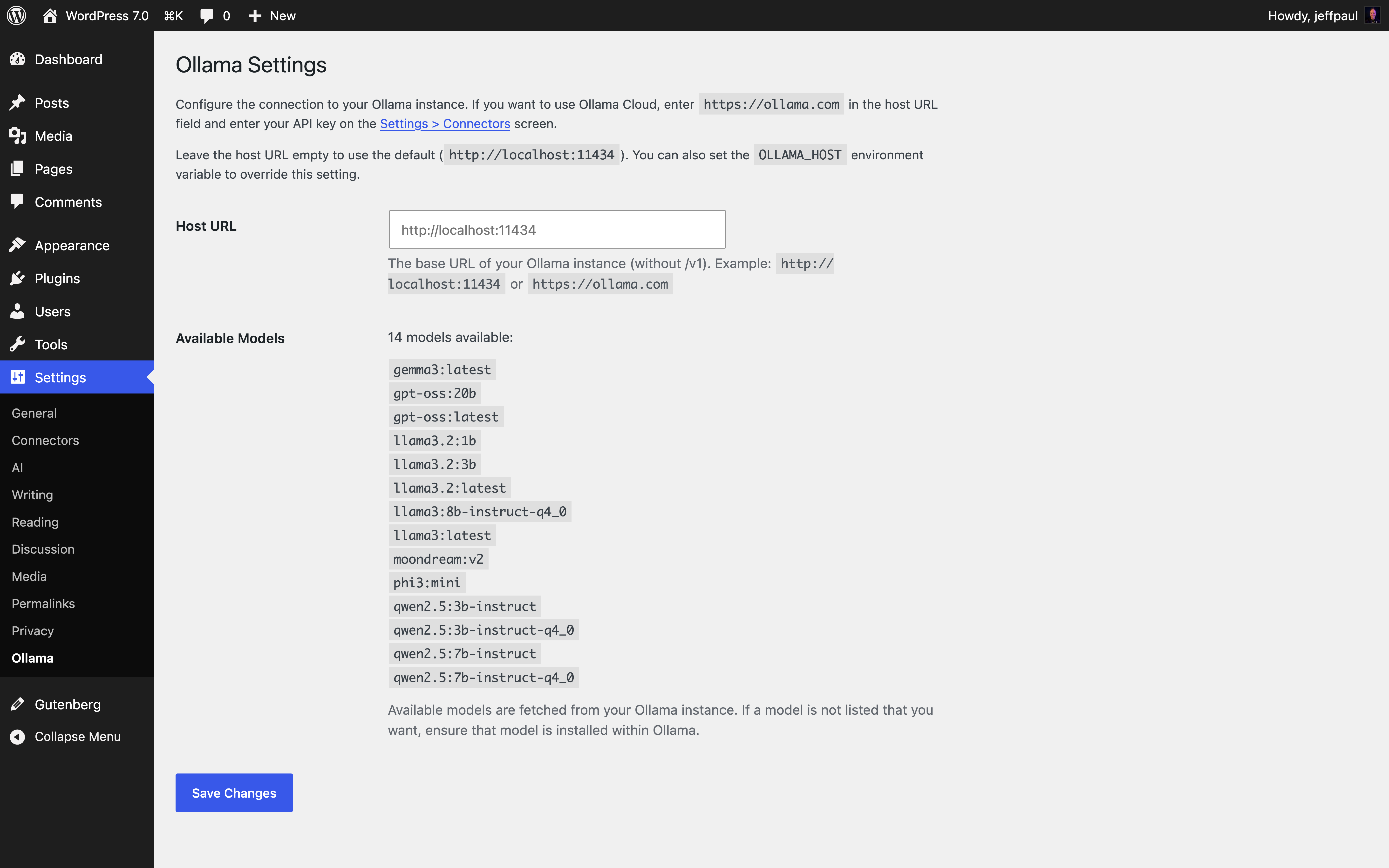
- Settings page for host URL and seeing available models
- Works without an API key for local instances
Requirements:
- PHP 7.4 or higher
- WordPress 7.0 or higher
- Ollama running locally or on a remote server (like Ollama Cloud)
Screenshots
Installation
- Upload the plugin files to
/wp-content/plugins/ai-provider-for-ollama/. - Activate the plugin through the ‘Plugins’ menu in WordPress.
- Go to Settings > Ollama to configure the host URL and see available models.
FAQ
-
How do I install Ollama?
-
Visit ollama.com to download and install Ollama for your platform. Once installed, pull a model (example
ollama pull llama3.2) and the provider will automatically discover it. -
Do I need an API key?
-
No. For local Ollama instances, no API key is needed. The plugin automatically handles authentication for local setups.
For remote Ollama instances that require authentication, enter the API key in the Settings > Connectors screen. If using Ollama Cloud, you also need to set your Ollama host URL in the Settings > Ollama screen to
https://ollama.com. -
How do I change the Ollama host URL?
-
By default, the provider connects to
http://localhost:11434. You can change this in two ways:- Set the
OLLAMA_HOSTenvironment variable (takes precedence). - Go to Settings > Ollama in the WordPress admin and enter your host URL.
- Set the
-
Where do I report security bugs found in this plugin?
-
Please report security bugs found in the source code of the AI Provider for Ollama plugin through the Patchstack Vulnerability Disclosure Program. The Patchstack team will assist you with verification, CVE assignment, and notify the developers of this plugin.
Reviews


Contributors & Developers
“AI Provider for Ollama” is open source software. The following people have contributed to this plugin.
Contributors


“AI Provider for Ollama” has been translated into 5 locales. Thank you to the translators for their contributions.
Translate “AI Provider for Ollama” into your language.
Interested in development?
Browse the code, check out the SVN repository, or subscribe to the development log by RSS.
Changelog
1.3.0 – 2026-10-13
Added
- Support for Jev-style decision models (#103).
ai_provider_for_ollama_request_timeoutandai_provider_for_ollama_connect_timeoutfilters to override Ollama request and connect timeouts (#89).
Changed
- Optimized Ollama model discovery and availability checks by caching model details, reducing redundant
/api/showrequests, and adding separate timeouts for discovery requests (#100).
Fixed
- Ensure we only declare function calling support on models that advertise support for tools (#94).
1.2.0 – 2026-08-18
Added
Changed
1.1.1 – 2026-05-14
Added
– Ensure the AI plugin sees Ollama as a valid, connected provider within the status dashboard widget (props @dkotter, @jeffpaul via #55).
Fixed
– More robust path inclusion for the logo (props @dkotter, @abcdatos via #61).
1.1.0 – 2026-04-23
- Added: Support for image generation when using compatible models (props @milindmore22, @dkotter via #30).
- Added: Integrate with the
wpai_has_ai_credentialsfilter to ensure the AI plugin sees Ollama as a valid, connected provider (props @dkotter, @jeffpaul via #43). - Added: Show the capabilities of each model next to the model name on our settings page (props @dkotter, @jeffpaul via #51).
- Changed: Increase the standard timeout to be 60 seconds for text generation (props @dkotter, @jeffpaul via #49).
- Fixed: Properly parse structured outputs (props @dkotter, @jeffpaul via #49).